

Overview of YouTubeGet
YouTubeGet is a tool designed to simplify the process of downloading videos from YouTube. With the increasing popularity of online videos, many users find it essential to download content for personal use or other purposes. YouTubeGet provides a solution to this need with its user-friendly interface and multiple features.
Program Features
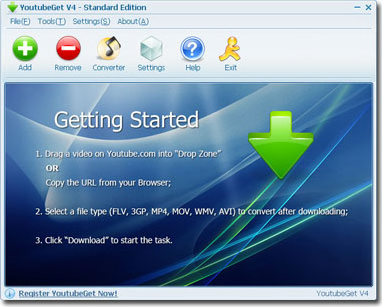
YouTubeGet comes with a range of features that make it an ideal choice for users looking to download videos from YouTube:
- Ease of Use: The program features a simple and intuitive user interface, making the video downloading process smooth for users of all technical levels.
- Fast Downloads: The program offers high-speed video downloads, saving users time and effort.
- Support for Multiple Formats: Users can download videos in various formats such as MP4, MP3, AVI, and more.
- Format Conversion: The program allows users to convert videos to different formats after downloading, providing greater flexibility in usage.
- Playlist Downloads: Users can download entire playlists with a single click, making it easier to gather videos.
What's New in the Program

The latest version of YouTubeGet has introduced several new features that enhance the program's efficiency and user experience:
-
- Support for High-Definition Videos: Users can now download videos in 4K and 8K resolutions.
- Performance Improvements: Download speeds have been enhanced, and resource consumption has been reduced.
- Improved Interface: The interface has been redesigned to be more attractive and user-friendly.
How to Use the Program
Using YouTubeGet is very straightforward and involves the following steps:
- Download and install the program from the official website.
- Open the program and enter the video link you wish to download in the designated field.
- Select the desired format and resolution for the video.
- Click the "Download" button to start the downloading process.
- Once the download is complete, you can find the video in the folder you specified earlier.
Program Drawbacks
Despite the many features offered by YouTubeGet, there are some drawbacks to consider:
- The program may not support some other sites besides YouTube, which limits its flexibility.
- Some users may experience compatibility issues with older operating systems.
- The program is paid, meaning some features may not be available in the free version.
System Requirements
Before downloading YouTubeGet, ensure that your computer meets the following requirements:
- Operating System: Windows 7/8/10 or Mac OS X 10.9 or later.
- Processor: 1 GHz or faster processor.
- Memory: 512 MB of RAM or more.
- Disk Space: 100 MB of free disk space.
Latest Version of the Program
The latest version of YouTubeGet was released in 2023 and includes all the enhanced and new features mentioned earlier. It is always recommended to download the latest version to ensure optimal performance and user experience.
Comparison with Other Programs
When comparing YouTubeGet with other available video downloading programs, we find that:
- In terms of speed: YouTubeGet excels thanks to its optimized downloading algorithms.
- In terms of ease of use: It is one of the easiest programs to use due to its simple interface.
- In terms of support: YouTubeGet primarily focuses on YouTube, which may be a drawback compared to other programs that support multiple sites.
Conclusion
In conclusion, YouTubeGet is an excellent choice for those looking for a simple and effective solution to download videos from YouTube. With a wide range of features and ease of use, users can enjoy a seamless and efficient downloading experience. However, users should consider some drawbacks and limitations when making a purchase decision.
Q&A about the Program
Q: Can I use YouTubeGet to download videos from sites other than YouTube?
A: YouTubeGet primarily focuses on downloading videos from YouTube and may not be compatible with other video sites.
Q: Does the program require a subscription fee?
A: The program offers a free version, but some advanced features require purchasing the full version.
Q: Does YouTubeGet support downloading videos in 4K resolution?
A: Yes, the latest version of the program supports downloading videos in resolutions up to 4K and 8K.

 File Name:
 Version:
 Full Version:
 Created By:
 License Type:
 Release Date:
 Languages:
 Tags:
Tags:


