


The best program for reading PDF files is essential due to the widespread use of the internet among individuals and the significant revolution in information transfer, which includes videos, images, and predominantly PDF files. Therefore, having a PDF reader is crucial as it allows you to read your files easily and share them with others. Some of these programs even offer the ability to edit the PDF files themselves.
What is a PDF Reader?
A PDF reader is an application that helps you open and read PDF files, as well as search, share, and print them. It allows you to control the appearance of the PDF file itself. Whether you are a student, a business owner, or just an ordinary person, having a PDF reader on your device, whether it's a computer, laptop, or mobile, is essential. In this article, we will present the best program for reading PDF files and highlight the most important information about it in 9 points.
Best Programs for Reading PDF Files
There are many programs specifically designed for reading PDF files, so we have selected a list of the best PDF readers for you.
1- Foxit PDF Reader
Foxit PDF Reader is one of the most popular programs for reading PDF files. It is lightweight and packed with features that many users prefer. Its simple interface resembles Microsoft programs, making it very suitable for beginners. It offers easy navigation, high-quality printing, the ability to open multiple files simultaneously, and lets you take notes within the PDF file and edit it. You can also choose a reading mode that suits you, organize texts into portfolios, create your own PDF files, and send them to friends while tracking all activities related to these files, such as who opened or edited them. There are two versions of Foxit PDF Reader: a free reader and a paid editor.
2- Adobe Acrobat Reader DC

Adobe Acrobat Reader DC is one of the best programs on the list for reading PDF files. It is developed by Adobe, a company with extensive experience in programming, and it continues to update the program. This software features easy navigation, zooming options, text highlighting, multiple reading modes, and the ability to add electronic signatures within the file. It works seamlessly with Windows 7, 8, 10, and 11, making it a preferred choice for many users, especially since it allows converting PDF files to various formats, which is important for many. There are two versions of Adobe Acrobat Reader DC: one free, which I believe is sufficient for its many features, and another paid version.
3- Sumatra PDF
Sumatra PDF is known for being lightweight, smooth, and open-source, making it very suitable for simple devices. It includes many features, such as keyboard shortcuts that help you navigate while reading. It is compatible with older versions of Windows like XP, 7, and 8, as well as Windows 10. It supports several formats in addition to PDF, including EPUB, MOBI, FB2, CHM, XPS, and others. However, a downside of this program is that it does not allow leaving notes on the PDF file, nor does it support filling out forms.
4- Nitro Reader
Nitro Reader is a unique blend of ease of use and great features. It allows you to zoom in and out, flip pages with a hand gesture or a click, bookmark pages for later reading, convert text to images, and write notes and highlight text directly on the file. It also has a simple user interface, the ability to open multiple files simultaneously, and the capability to protect your PDF files from others. The program supports converting over 300 formats to PDF documents, making Nitro Reader the best PDF reader for Windows 10, 8, and 7, and it is the ideal choice for those looking for ease of use and a lightweight application.
5- Slim PDF Reader
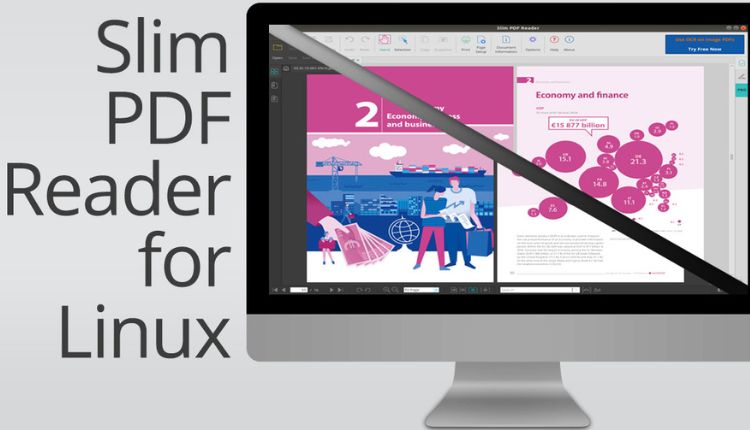
Slim PDF Reader is one of the easiest and lightest programs, making it very suitable for users with low-spec devices. It provides only the basic tools and features a simple and attractive interface. It also includes a night mode for reading at night to avoid eye strain. The program works with Windows operating systems such as Windows 7, 8, 10, and XP. It allows you to crop and merge PDF pages but lacks tools for signing, filling, or commenting, and does not support text highlighting. However, it does allow easy conversion to and from PDF format in just a few steps, and it is known for its fast file loading capabilities. It also supports easy sharing via social media and email, along with direct printing to an external printer. It supports multiple languages, including Chinese and Spanish, but does not offer many keyboard shortcuts.
6- Javelin PDF Readers
Javelin PDF Readers is a standout program that you can use whether you are on Windows, Linux, or Mac. The program has a distinctive interface and offers a fantastic feature of full-screen reading, as well as the ability to open two pages side by side. It supports a search feature that helps you find any text or phrase you are looking for within the document, and you can scroll through PDF documents up and down. It works with Windows 7 or 10, and provides very advanced encryption features to protect your PDF documents. You can also convert text to speech, which makes it one of the best PDF reader programs for computers. However, the program has some drawbacks, including a complicated installation process and performance issues when opening large documents.
7- Cool PDF Reader
If you are looking for a unique program that allows you to read PDF files and eBooks smoothly, and is very lightweight, we recommend this program. It has the ability to convert PDF files to many formats, including EMF, EPS, TIFF, JPG, GIF, PNG, TXT, and others, as well as the capability to print files directly through it.
Conclusion
In this article, after discussing the best program for reading PDF files, we now have an overview of the top programs, some of which are free but offer basic features, while others are paid. But how can you determine which one to choose? This question requires your focus, as it all depends on why you need the program in the first place. Here are some important factors to consider: choose a type that suits your mobile device and is easy to use. If you are a beginner, you should opt for a simple, free program that is not complicated, such as Sumatra PDF . If you are a professional, we recommend the paid versions as they will provide you with many features that will assist you in your work. If reading is your favorite hobby, look for the best program for reading eBooks. Additionally, you should consider the nature of the documents you work with. If you are dealing with important and confidential documents, you should choose a reader that offers a high level of security, and it is necessary to download a protection program, and so on.


