


The 7 Best Ways to Download Embedded Videos for Free in 2024: Are you struggling to download embedded videos online? The answer is likely yes, as many of us face such challenges due to a lack of knowledge and experience with embedded video downloaders.
How much time do you spend on video streaming sites? Have you ever wondered how to download embedded videos from websites and watch them without distractions? If so, you can try the best 7 ways to download embedded videos for free in 2024.
What is an Embedded Video?
Embedding refers to hosting videos on another site, such as blogs and articles, so users can watch them without needing to navigate to the original webpage.
How to Download Embedded Videos?
Successfully downloading embedded videos from video-sharing sites like YouTube, Vimeo, Facebook, and Twitter is not as easy as you might think.
To simplify things for you, we've done all the hard work and outlined the best 7 ways to download embedded videos for free in 2024 below, so you can download your chosen content hassle-free.
The 7 Best Ways to Download Embedded Videos for Free in 2024
Here are the best methods to download embedded videos for free in 2024 that will give you a clear understanding of how to download embedded videos from websites as well as video hosting platforms:
Method 1: Download Embedded Videos Directly from Websites
There are specific embedded videos that can be easily downloaded; for example, if the video on the website is in MP4 format, it can be saved without much hassle, just like saving an image online.
Follow the simple steps below to download the video:
Right-click on the video and select the "Save video as" option.
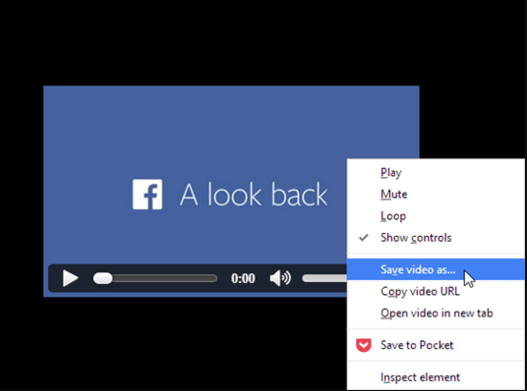
Download embedded videos directly from websites
Now, choose the download location on your device where you want to save the embedded video.
Once done, press "Enter" or click the "Save" button.
Method 2: Download Videos Using Free Video Downloaders
You may find many video downloaders in the market that not only allow you to download high-quality videos from various video-sharing sites but also help in downloading those embedded in a webpage.
Here are some of the most efficient video download tools worth trying
Download your favorite videos with a single click using ByClickDownloader
1. By ByClickDownloader
Another very useful and effective tool for downloading embedded videos is ByClick Downloader, which enables users to download embedded videos from YouTube, Facebook, Twitter, Instagram, Tumblr, Vimeo, Metacafe, Flickr, and other similar sites. Additionally, the tool offers the option to download videos in the desired format, such as HD and 4K.
Here are the steps to download an embedded video using ByClick Downloader.
Step 1: Click on the download option to download ByClick Downloader to your device.
Step 2: Follow the on-screen instructions to install the downloaded setup file.
Step 3: Launch the program and paste the embedded video link from the desired website.
Step 4: Click on the desired option.
Step 5: Choose the video format and quality. Wait for the embedded video to finish downloading to your computer.
This is how you can use ByClick Downloader to download embedded videos from any website.
You can now easily play the downloaded embedded video on your computer.
2. By 4K Video Downloader

4K Video Downloader is a flawless application for downloading video and audio from YouTube, Instagram, TikTok, and similar sites on Linux, Windows PC, and macOS completely free.
All you need to do is install the 4K Video Downloader app on your device and then follow the steps below.
Step 1: Open the 4K Video Downloader app.
Step 2: Copy the video URL from the browser that you want to download to your device.
Step 3: Next, click the "Paste Link" button in the app, select the video quality, and then press the "Download" button.
3. VLC Media Player
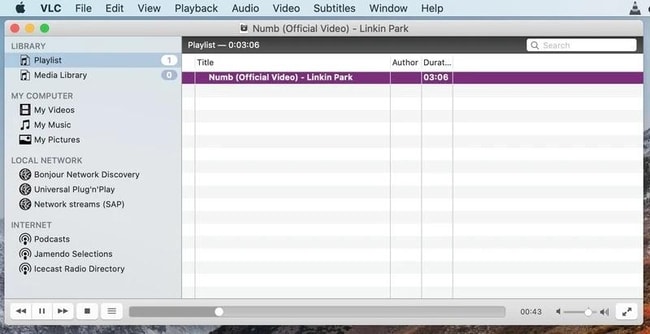
We often look for solutions and applications outside our computer environment, while some answers lie within our own computers.
One example is the ability of VLC Media Player to download embedded videos on your Windows devices, and here's how you can do it:
Step 1: Download VLC Media Player to your device (if you haven't already) and install it by following the instructions displayed on your screen.
Step 2: Launch the player and in the top menu, expand the media section and click on "Open Network Stream" or use the Ctrl + N shortcut keys together.
Step 3: In the media window, switch to the "Network" tab and paste the URL of the embedded video you want to download.
Step 4: Click the play button, expand the view section at the same time, and then click on the playlist.
Step 5: Once done, right-click on the video and choose the save option, select the location to save and the format of the embedded video.
This is how you can easily download an embedded video from any of the websites using VLC Media Player.
4. By Free HD Video Converter Factory
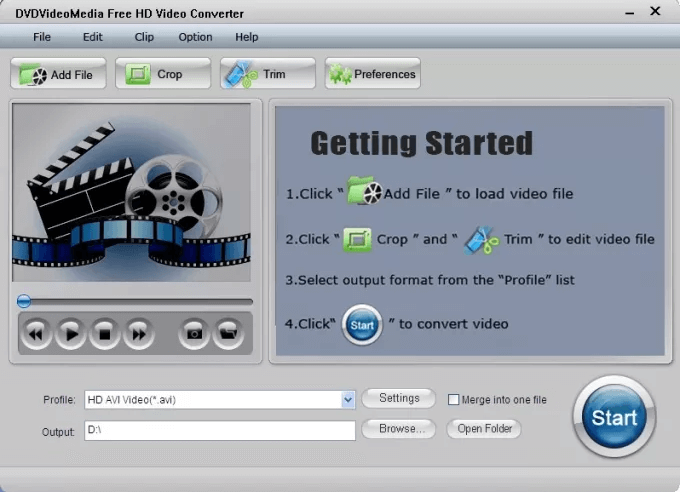
Follow the simple steps below to download an embedded video:
Step 1: Launch the application and open "Downloader".
Step 2: From the top, select the "New Download" option, and a new pop-up window saying "New Download" will now appear on the screen.
Step 3: Copy and paste the URL of the website with the embedded video in the "Add URL" section, then press the "Analyze" option to start the URL analysis process.
Step 4: Once completed, you will get the option to choose the video resolution of your choice, and finally, you will be prompted to select the download location for your embedded video file.
Step 5: Now, click "Download" from the bottom of the screen.
5. By EaseUS MobiMover
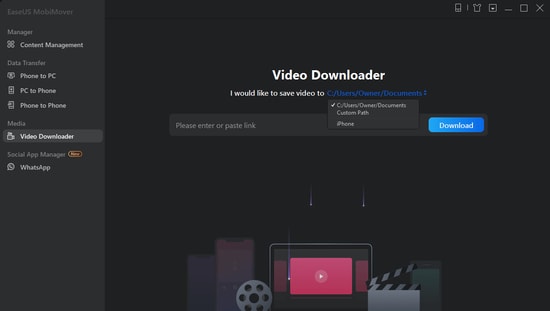
Do you want to download online videos from YouTube, Facebook, and over 1000 other sites to your computer? If yes, get EaseUS MobiMover for free and leave the rest to this flawless program.
Here are the step-by-step instructions to help you save your favorite videos for offline viewing.
Step 1: Launch the EaseUS MobiMover application and select the "Video Downloader" option from the left panel.
Step 2: Copy and paste the URL of the video you want to download in the designated bar, then press the "Download" button.
Step 3: After analyzing the URL, the app will quickly download the video to your computer (PC, Mac, or laptop).
6. By SaveFrom
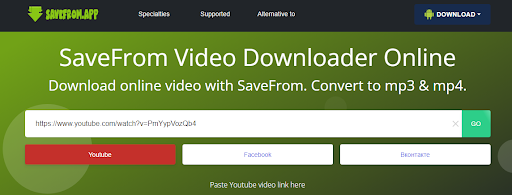
Finally, you can also use the SaveFrom app or downloader tool to easily download any embedded video.
With the tool's simple interface, you can easily download videos from various sources, including YouTube.
The best part of the tool is that it also allows you to select the video resolution before downloading for better results.
Step 1: Download the app from the official site and run it after installation.
Step 2: Copy and paste the URL of the video you want to download in the search bar, then wait a moment while it loads.
Step 3: The app will then present multiple options.
Click on any of them and save the video you want.
Note: Before starting the download, please ensure there are no restrictions in your country on downloading content from third-party sites.
Method 3: Download Embedded Video Using Chrome/Firefox Browser
If you're tired of installing software and browser extensions to download videos, this method is your ideal option; you can smartly download the videos you choose with the help of your web browsers.
Follow these steps to download embedded videos with Chrome/Firefox:
Step 1: First, you need to launch <a href="https://3almalt9nia.com/%d8%a3%d9%81%d8%b6%d9%84-12-%d8%a7%d9%85%d8%aa%d8%af%d8%a7%d8%af%d9%8b%d8%a7-%d9%84%d9%85%d8%aa%d8%b5%d9%81%d8%ad-google-chrome-%d8%aa%d8%b3%d8%aa%d8%ad%d9%82-%d8%a7%d9%84%d8%aa%d8%ac%d8%b1%d8%a8


