

Permanently Fixing Error R6025: When trying to run an application that requires the C++ Runtime Library, you may encounter Runtime Error R6025. This error can occur while playing Skyrim, logging into Windows, using Internet Explorer, playing games, or running other applications. In this article, I will discuss all possible methods to fix Runtime Error R6025 on Windows 10/8/7 and server devices.
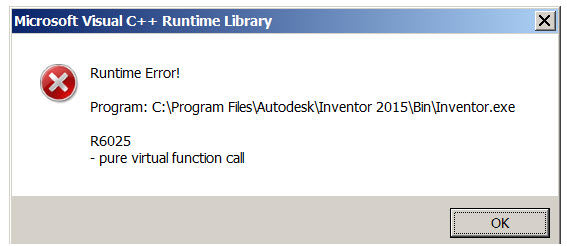
You might see the following error message when running Skyrim or another application:
Error:
Runtime Error "Microsoft Visual C++ Runtime Library"
!
Program: C...
R6025
An application attempted to load the C Runtime Library incorrectly.
Please contact the application support team for more information.
R6025 – Pure Virtual Function Call...
Runtime Error R6025 or "Runtime Error R6025 Pure Virtual Function Call" may appear when certain programs or processes are forced to stop. This error is often associated with the Visual C++ framework and occurs due to missing components or incompatibility with third-party software.
This error message indicates that a specific program attempted to call a "pure virtual function," but the call was invalid. We can illustrate this situation with an example. Imagine you are playing an online game, and the server is down; in this case, your computer may deliver a runtime error message.
Generally, this Runtime Error R6025 indicates that a specific program is corrupted and cannot function. Moreover, like many other Windows issues and errors, this problem may also stem from registry issues, and thus, Runtime Error R6025 may be triggered by incorrect modifications in the Windows registry.
The main issue is that Runtime Error R6025 on the Windows operating system appears out of nowhere.
Computer users are not advised to modify the registry themselves, as it is easy to cause more harm than good. It is better to repair registry or system files using reputable software like Reimage, which also points out unnecessary or potentially intrusive applications.
This error may appear during program development; thus, this message may inform the developer of some bugs in the code or that certain functions need fixing. However, depending on how the program code is written, this error may not show up during the development phase but may appear at runtime.
For various reasons, users install applications that contain bugs or different issues leading to this error. Therefore, regular computer users who encounter this error should simply uninstall the program and install the latest version.
How to Fix Microsoft Visual C++ Runtime Error R6025?
You can try these steps to permanently fix Error R6025:
Method 1: Repair Using Advanced System Repair Tool
These errors often occur when some important system files are missing or corrupted. This file could be an exe file, a sys file, an ocx file, or a dll file or any other type of system file. To fix this issue, download the following R6025 repair tool and scan your computer.
Windows consists of a large number of dll files, exe files, sys files, various types of services, databases, and so on, so it is not possible to constantly monitor all files. A great PC optimization tool repairs damages, fixes errors, updates Windows and drivers, and silently removes various types of errors.
The Outbyte PC Repair Tool performs all the above tasks easily and provides you with a smooth and error-free Windows environment to work in so you can focus solely on your tasks.
3 Steps to Fix This Error
Step 1. Download the Outbyte Repair Tool [File Size: 16.4 MB]
Step 2. Scan your Windows computer
Step 3. Click the "Repair" button to fix the error
Method 2: Update Windows Operating System
The latest driver requires Windows updates to function correctly, and the latest Windows requires the latest driver to work properly. You should update your Windows operating system along with all installed drivers. This is the most convenient way to fix Runtime Error R6025.
Method 3: Repair MS Visual C++
The Microsoft Visual C++ Runtime Library seems to be corrupted, which is why you are getting Error R6025. Here are the steps to repair the corrupted Visual C++ Runtime Library.
1 Go to your browser and search for the following application.
Vcredist_x86.exe or VCredist_x64 or Microsoft Visual C++ Redistributable Package
You should download it from the Microsoft website. Never download it from third-party sites, only from the official Microsoft site.
2 Choose the version according to your operating system.
3 Install it and restart your computer.
Method 4: Run the System File Checker Tool
This tool is pre-installed in the Windows 10/8/7 operating system, and you can use it when the system starts reporting missing files. You can use this tool to fix system-related issues along with Runtime Error R6025.
Open Command Prompt as an administrator.
Type sfc /scannow and press Enter.
Wait for the process to complete.
Method 5: Analyze the Error in Clean Boot Mode
Start your computer in Clean Boot mode and check if it is due to a service conflict. If your computer works perfectly in Clean Boot mode and you do not get Error R6025, it means that some services or drivers are conflicting with another application. To resolve this issue, uninstall the recently installed driver, remove unused programs and drivers, and update all drivers.
Method 6: Fix the Yellow Mark in Device Manager
You should check Device Manager for a yellow mark on the installed driver. Open Device Manager and check for the yellow mark. If any driver has a yellow mark, right-click on it and click on Update Driver. Then, search the internet for the driver and click "OK."
Conclusion
In this article, we discussed how to permanently fix Error R6025, which is related to the forced termination of a program or process. Its appearance is directly linked to the Visual C++ platform and often arises from incompatibility with third-party software or missing program components.
I have explained all possible methods to fix Runtime Error R6025 Visual C++ Runtime Library Error in this article.
To resolve the situation in your favor, you can use the methods outlined in this article. If you find other ways to solve this issue, please share your experience in the comments so others can benefit.


