


Fixing the Missing Winsock32.dll Error: Are you looking to download WSOCK32.DLL or need a solution to fix the "WSOCK32.DLL is missing from your computer" error?
If so, you’re in the right place. In this article, you will find all the necessary information to resolve this error message. The information below will assist you in solving your issue and getting rid of the frustrating WSOCK32.DLL error.
You may encounter issues related to Wsock32.dll on your Windows PC and wonder how to fix them. If you are already suffering due to these DLL files, it means you are unable to open certain applications and games, unable to run your computer, and programs may crash randomly. The following error may appear if there is an issue with wsock32.dll.
This file is crucial as it handles network connections. If this file is lost or deleted, you may face difficulties with network connections and accessing the internet.
What is a DLL?
DLL stands for Dynamic Link Library, which acts as a collection of instructions or functions that other programs can use. The purpose of a DLL file is to save disk space by providing quick access to the necessary code and data for certain applications to function. The benefit is that programs use a shared DLL file instead of storing data in their own files, making your computer run faster.
What does the "WSOCK32.DLL" error mean?
WSOCK32.DLL is an important component for some Windows applications, and the error message indicates that the file is corrupted or missing, affecting the program. This could be caused by malware, improper installations, faulty programs, registry issues, etc.
Common error messages related to WSOCK32.DLL include:
- "The program cannot start because WSOCK32.DLL is missing from your computer."
- "An error occurred while loading WSOCK32.DLL. The specified module could not be found."
- "There was a problem starting WSOCK32.DLL."
- "Could not locate WSOCK32.DLL."
- "Cannot register WSOCK32.DLL."
The WSOCK32.DLL error can be addressed in the same way regardless of the cause.
Why does the Wsock32.dll error occur?
The Wsock32.dll error mainly occurs due to one of the following reasons:
- The Wsock32.dll file is missing, deleted, or corrupted.
- This file is replaced by other external programs.
- Registry entries for this file are missing, making it inaccessible.
- Other harmful programs or drivers continuously use this file.
- Your operating system is not updated, so it does not recognize the file, etc.
How to fix the missing Wsock32.dll file error?
Here are some unique and tested methods that will help you fix this error:
Method 1: Repair using Advanced System Repair Tool
The most common reason for Wsock32.dll issues is that missing system files are corrupted, such as DLL files, EXE files, sys files, etc. There are thousands of small system files that perform specific tasks. If one of these files is replaced, deleted, or corrupted, you may encounter the Wsock32.dll Not Found or Missing Error.
Windows consists of a large number of dll files, exe files, sys files, various types of services, databases, and so on, so it’s not feasible to constantly monitor all files. A great PC optimization tool repairs damages, fixes errors, updates Windows and drivers, and silently removes various types of errors.
The Outbyte PC Repair Tool performs all the above tasks effortlessly and provides you with a smooth and error-free Windows environment to work in so you can focus solely on your tasks.
3 steps to fix this error:
Step 1. Download the Outbyte PC Repair Tool [File size: 16.4 MB].
Step 2. Scan your Windows computer.
Step 3. Click the "Repair" button to fix the error.
Method 2: Download and manually replace the Wsock32.dll file.
This method is somewhat tricky and risky; you should have some deep knowledge of your operating system to carry out this procedure.
Step 1: Download wsock32.dll
Download the wsock32.dll file from the Microsoft website or another legitimate site. You should not download this file from any suspicious website, or you may end up downloading viruses/malware and installing them.
Step 2: Save this file in c:\Windows\System32.
Step 3: Open the command prompt and execute the following command.
Regsvr32 wsock32.dll
Step 4: You will see a message indicating that wsock32.dll has been registered successfully. If you receive the following error message, you need to download the advanced system repair tool to fix this issue.
Method 3: Update Windows, drivers, and all other installed applications.
Updating your Windows operating system, drivers, and all other installed applications may be the best solution to fix this DLL error. When you update Windows, this process installs many missing files and makes your computer error-free. You can update Windows as follows:
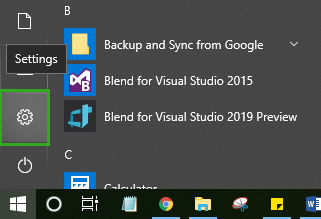
Step 1: Go to the Start menu and click on Settings.
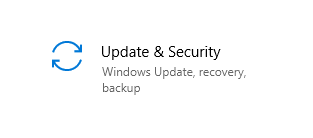
Step 2: Click on Update & Security.
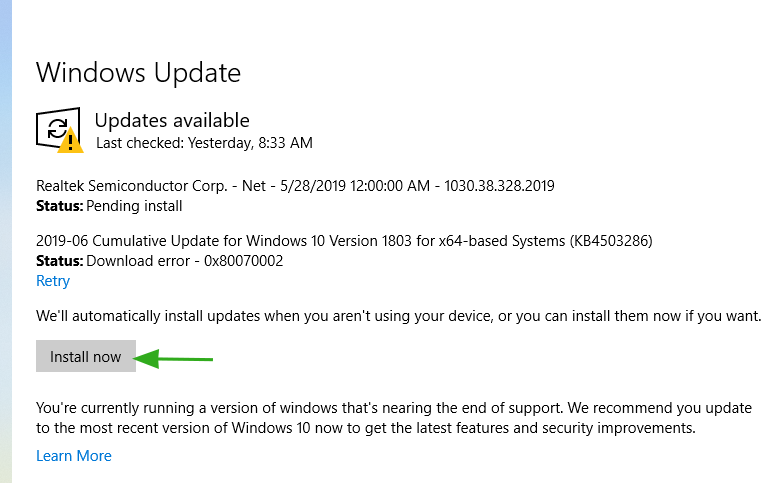
Step 3: Here, click the "Install Now" or "Download" button to download and install the latest updates.
Method 4: Run the System File Checker tool
You can use a built-in command-line tool that allows you to scan your computer and repair missing or deleted system files.
Conclusion
In this article, we discussed how to fix the missing Winsock32.dll error.
I explained four methods on how to fix the missing Wsock32.dll error. If this file has been deleted or lost, you may not be able to establish a proper network connection. Follow this article to resolve this error.
You might also like
The Complete Guide to Fixing DLL Errors on Windows 10 and Windows 11
8 Ways to Fix d3dx9_43.dll Error


