

Discover the latest developments in SolidWorks: Do you want to enhance your SolidWorks skills? Are you interested in learning more about the latest advancements in SolidWorks design? If so, you're in the right place. In this article, we will discuss the advanced design options in SolidWorks and how you can leverage them to your advantage.
What is SolidWorks?
SolidWorks is a widely used 3D design software in the field of mechatronics. It allows engineers to digitally design, develop, and model complex products such as smartphones, automatic door locks, and even self-driving cars.
SolidWorks was first introduced in November 1995 as SolidWorks 95 by MIT graduate Jon Hirschtick and was later acquired by Dassault Systèmes in 1997.
The software provides tools for both 2D and 3D designs, making it a leader in computer-aided design (CAD) for mechanical engineering.
What are the Uses of SolidWorks?
SolidWorks is a comprehensive tool for developing robust mechatronic systems from start to finish.
Planning and Conceptualization: It helps visualize ideas, model prototypes, and manage projects.
Design and Development: It enables the creation of mechanical, electrical, and software components.
Management and Analytics: It facilitates device management, data automation, and cloud-based services.
The software targets mechanical, electrical, and electronics engineers, providing seamless connectivity and synchronization for team projects. It is user-friendly, affordable, and continuously updated to meet diverse business needs.
Discover the Latest Developments in SolidWorks
Engineers and designers use SolidWorks to create complex 3D models and simulations for industries such as consumer goods, medical devices, aerospace, and transportation. The software offers a wide range of features, making it suitable for both beginners and advanced users.
Features in SolidWorks
SolidWorks continuously updates its software to keep up with the latest trends. Here are some notable features:
1. Enhanced Simulation Capabilities
Improved simulation tools help designers predict system behavior by accurately simulating complex scenarios.
2. Assembly Structure System
This feature, introduced in SolidWorks 2020, organizes complex assemblies into folders and subfolders, reducing errors and saving time.
3. Simplified User Interface
The streamlined interface makes navigating the software and accessing features easier for users.
4. Mesh Modeling
This tool simplifies the design of complex structures by allowing control over mesh geometry, making it ideal for the automotive and consumer goods industries.
5. Topology Study
A relatively new feature that allows for weight and strength optimization through stress modeling. It is particularly useful in the aerospace and automotive sectors, where weight reduction is critical.
Innovative Design Capabilities with SolidWorks
The advanced tools and features of SolidWorks offer a wide range of creative possibilities:
Design Optimization
Simulation tools enhance performance and efficiency, producing cost-effective designs that meet consumer standards.
Advanced Flattening
This allows for the creation of complex structures, ideal for the automotive and consumer goods industries that prioritize aesthetics.
Additive Manufacturing
This facilitates the creation of 3D-printable models using additive manufacturing techniques, widely used in the medical and aerospace sectors.
Collaboration
Real-time cloud collaboration allows teams to work together seamlessly, improving production quality and fostering innovation.
What are the Simulation Capabilities of SolidWorks?
You have a new design, and it looks great. But how can you ensure it will work as expected? Waiting until the production stage to test your design can be costly and time-consuming. Some questions you might ask yourself are: How do I decide the right direction while still in the design phase? How do I ensure my design is strong and efficient enough while minimizing costs? What about design changes and other unforeseen challenges?
Ignoring these issues until later in the design process can lead to complete production halts due to design flaws or product recalls. There must be a more efficient approach.
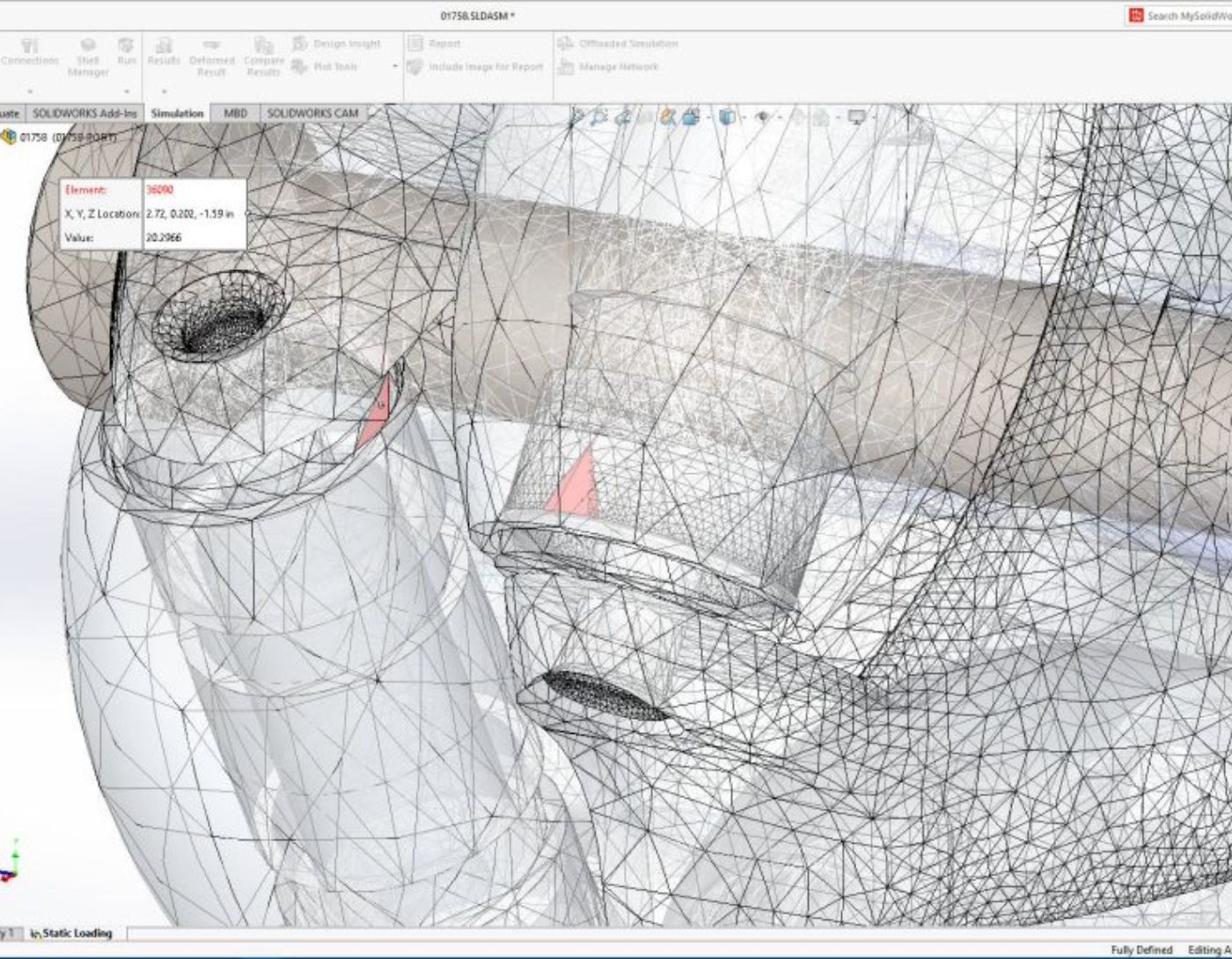
SOLIDWORKS Simulation offers a suite of tools that leverage finite element analysis (FEA) to predict the physical behavior of a product by virtually testing CAD models. It also provides linear and nonlinear, static and dynamic analysis capabilities.
What are the System Requirements to Run SolidWorks?
To run SolidWorks effectively, you will need:
- A 64-bit Windows operating system.
- At least 16 GB of RAM.
- A multi-core processor and a certified graphics card.
- High-performance hardware ensures smoother operation and faster rendering.
What New Updates are Expected in SolidWorks 2024?
SolidWorks 2024 is set to introduce several major enhancements, including:
- Advanced simulation tools for better design validation.
- A simplified user interface to improve efficiency.
- Real-time collaboration features to enhance teamwork.
- Performance improvements for faster responsiveness.
Frequently Asked Questions
1. What is SolidWorks and what are its uses?
SolidWorks is a computer-aided design (CAD) software widely used in engineering, product design, and manufacturing. It helps users create detailed 3D models, assemblies, and 2D drawings for various applications, including mechanical parts, tools, and consumer products.
2. Is SolidWorks suitable for beginners?
Yes, SolidWorks is designed with a user-friendly interface and comprehensive tutorials. Beginners can quickly grasp the basic modeling tools, while advanced features cater to professionals in specialized fields.
3. Can I use SolidWorks for 3D printing?
Absolutely! SolidWorks can export files in formats like STL, which are compatible with most 3D printers. It also includes tools for preparing models specifically for 3D printing.
4. Is SolidWorks available for Mac users?
SolidWorks does not support macOS. However, Mac users can run it using virtual machines like Parallels or Boot Camp to install Windows on their devices.
5. How does SolidWorks compare to other CAD software?
SolidWorks is known for its user-friendly interface and powerful simulation tools. While competing software like AutoCAD excels in 2D drawing, SolidWorks stands out in 3D parametric modeling and assembly design.
6. Does SolidWorks offer simulation capabilities?
Yes, SolidWorks includes simulation tools that allow users to test the performance of their designs under real-world conditions. These features help analyze stress, thermal effects, fluid dynamics, and other factors.
7. What file formats can SolidWorks open and export?
SolidWorks supports a variety of file formats, including STEP, IGES, STL, DXF, DWG, and Parasolid. This flexibility allows for easy collaboration with other CAD software.
8. How can I effectively learn SolidWorks?
SolidWorks can be learned through online tutorials, user forums, and organized courses offered by SolidWorks vendors or institutions.
9. How does SolidWorks assist in 3D modeling and simulation?
SolidWorks provides powerful tools for 3D modeling and simulation, allowing users to visualize and test designs under real-world conditions. This helps identify potential issues early, improving design accuracy and enhancing product performance.
10. What are the advantages of using SolidWorks in additive manufacturing?
SolidWorks offers specialized tools for additive manufacturing, enabling the creation of 3D-printable models with complex geometries. This is essential in industries like medical and aerospace that require intricate and customized designs.
11. What industries commonly use SolidWorks, and why is it so popular?
SolidWorks is widely used in industries such as automotive, aerospace, consumer goods, and medical devices. Its popularity stems from its user-friendly interface, advanced design tools, and ability to support detailed simulations and complex assemblies, streamlining the design process.
Conclusion
Explore the latest developments in SolidWorks. In today's competitive world, innovative design is crucial. SolidWorks empowers designers to push boundaries and create groundbreaking solutions. From design optimization to advanced manufacturing and additive manufacturing, its powerful tools and features offer limitless possibilities.


