


Are you looking for a comprehensive review of iSkysoft iMedia Converter Delverter Deluxe? If so, this article is tailored for you. Here, we will discuss the iSkysoft iMedia Converter Delverter Deluxe review and provide you with all the essential information you need to know.
iSkysoft iMedia Converter Delverter Deluxe offers a robust media platform for converting video and audio files into suitable formats. Thus, this tool meets all your media conversion needs. With this efficient and fast-performing software, you can convert, download, edit, copy, and record videos, among many other features.
Continue reading this article to learn about the features and advantages of iSkysoft iMedia Converter Deluxe. Stay with us.
Review of iSkysoft iMedia Converter Deluxe
iSkysoft iMedia Converter Deluxe is undoubtedly a premium tool, and the company offers a free trial version of the software to give you a glimpse of all the features you can enjoy. The iMedia program includes some video editing features in addition to the standard media conversion options that I will mention later in the review.
Let’s say you have a long, unedited clip that you need to trim and modify before converting it to another format. The iMedia Converter allows you to make the necessary edits by selecting the part of the video you want and cutting out the unwanted section.
You can also crop images and adjust basic video properties like brightness, contrast, and saturation effortlessly. The software also features some filters, the ability to add watermarks, and even subtitles, but if you want more advanced editing, you will need to purchase a dedicated video editing program.
One of the additional useful features of iMedia Converter is its ability to download videos from the internet. It works just like other dedicated programs such as KeepVid or YTD; you only need the URL of the video you want to download, paste it directly into the download tool, and you will have the video saved to your hard drive, ready for editing or conversion.
The software is not just a premium tool for media conversion. Once you successfully download a video, if you have any modified or converted media, the iSkysoft Media Converter also allows you to burn it to a DVD. This feature is very useful and easily accessible.
iSkysoft iMedia Converter Deluxe
Simply drag the file you want to copy to the DVD, choose a template from the list. There aren’t many customization options available, but that’s not necessary; the output media will be supported by almost every DVD player without any hassle.
Primarily, the main function of this software is to convert videos from one format to another, and it does the job perfectly. Moreover, while converting files from one format to another, this application allows you to create custom videos for iOS and other mobile devices. This is often useful when you need to transfer media to your smartphone, tablets, or gaming devices.
Overall, the iMedia Converter alone handles most of the tasks of multiple programs. Consider trying this tool; you won’t need any DVD burners, or video downloader, or basic video editor, and of course, no media converter.
Features of iSkysoft iMedia Converter Delverter Deluxe
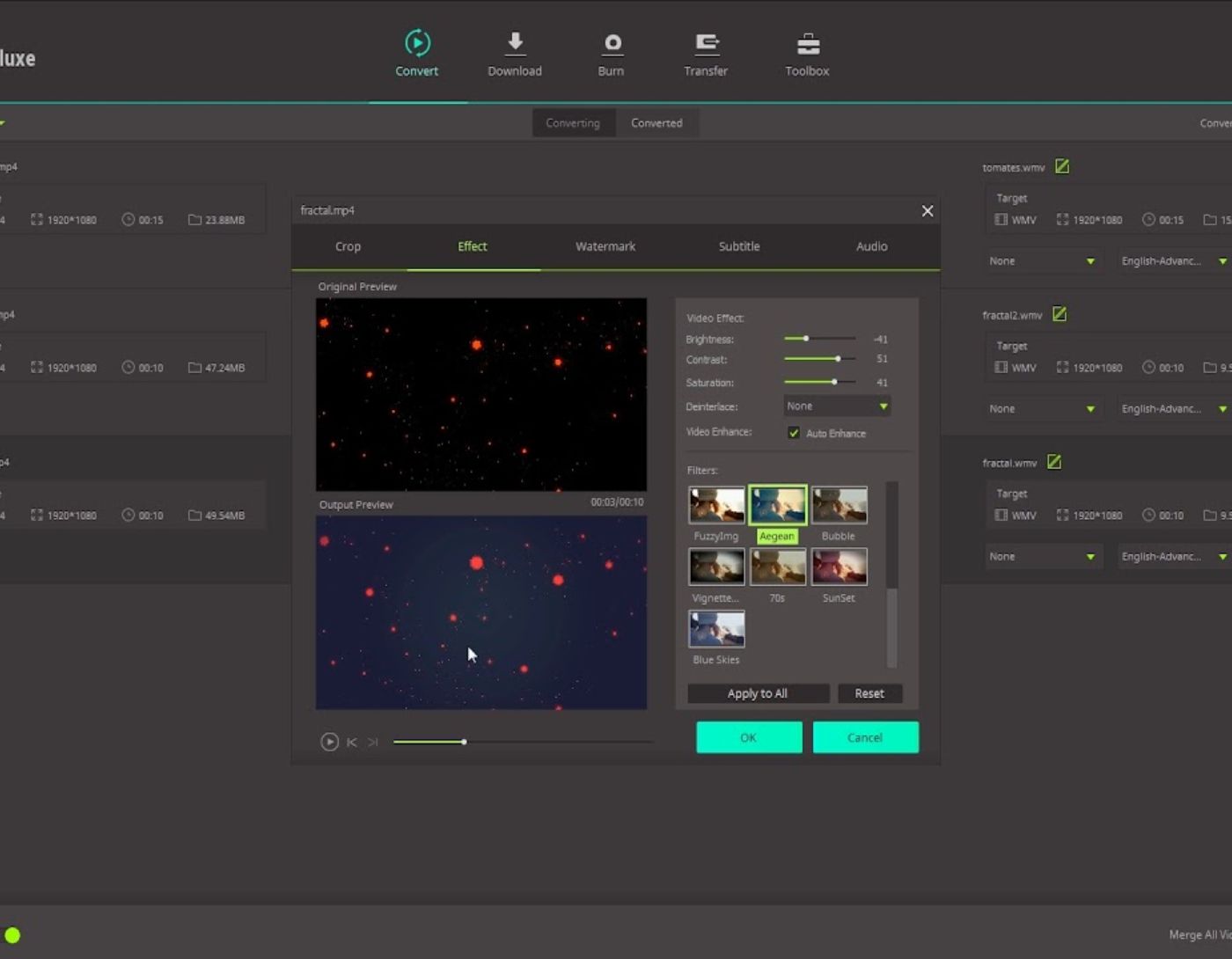
Easy video editing with iMedia Converter. You can easily trim, add watermarks, subtitles, crop, rotate, and control audio volume, etc.; you can also merge multiple videos into one and convert it later.
iSkysoft makes it easy to capture screenshots of the current video being converted, played, or edited. You can save them in supported formats like BMP and JPEG and use them later for various purposes. You can also play different DVD formats that you want to convert accordingly.
Features
While using this software, you will also find that it can automatically detect existing media, and you can record it using the built-in video recording tool. You can also convert media files to DVD images, back up DVDs, or convert and save them to the cloud.
Advantages
Convert DVD, audio, and video media for personal use.
Easily download and record media from the internet.
Use built-in editing tools to customize your videos.
A built-in DVD burner feature is available.
The iMedia Converter application runs smoothly on MAC OS and works correctly on Windows 10, 8.1, 8, 7, Vista, and other versions as well.
Regarding media, the software works seamlessly with MP4, MPG, MPEG, and other supported file formats totaling 158 formats.
Help and Support
iSkysoft offers a wide range of options for both customer support and technical assistance. If you encounter any issues related to the conversion tool, you can browse a comprehensive FAQ section that covers most problems. You can then contact the team via email or live chat option; unfortunately, phone support is not available.
FAQs
What is iSkysoft iMedia Converter Deluxe?
iSkysoft iMedia Converter Deluxe is a comprehensive multimedia conversion tool that allows you to convert, edit, burn, download, and play videos and DVDs. It supports a wide range of formats and provides various editing features.
What are the main features of iSkysoft iMedia Converter Deluxe?
Main features include converting videos between over 150 formats, burning and copying DVDs, video editing (trimming, cropping, adding effects), downloading online videos from over 1000 sites, and transferring converted or downloaded files to mobile devices.
What platforms does iSkysoft iMedia Converter Delverter Deluxe support?
It supports both Windows and Mac systems.
How easy is it to use iSkysoft iMedia Converter Deluxe?
iSkysoft iMedia Converter Deluxe is designed with a user-friendly interface that makes it easy for users to perform various tasks such as converting, editing, and downloading videos without requiring high technical skills.
Is iSkysoft iMedia Converter Deluxe safe to use?
Yes, iSkysoft iMedia Converter Delverter Deluxe is generally safe to use; it does not contain any malware or adware. However, it is always good to download software from trusted sources.
Can iSkysoft iMedia Converter Deluxe convert DRM-protected videos?
Yes, iSkysoft iMedia Converter Deluxe can convert DRM-protected videos, allowing you to enjoy your media on multiple devices without restrictions.
What are the system requirements for iSkysoft iMedia Converter Deluxe?
The exact requirements may vary by version, but it typically supports Windows 10/8/7/Vista/XP and Mac 10.15 Catalina, 10.14 Mojave, 10.13 High Sierra, 10.12 Sierra, 10.11 El Capitan, 10.10 Yosemite, 10.9 Mavericks, 10.8 Mountain Lion, and 10.7 Lion.
Is there a trial version of iSkysoft iMedia Converter Deluxe available?
Yes, iSkysoft offers a free trial version of iMedia Converter Deluxe, allowing users to test its features before purchasing.
Does iSkysoft iMedia Converter Delverter Deluxe provide customer support?
Yes, iSkysoft provides customer support via email for any inquiries or technical issues related to its products.
Conclusion
This was the review of iSkysoft iMedia Converter Deluxe. The software is compatible with iTunes and video editing tools like Final Cut Pro and iMovie. Furthermore, you can also use this program to download various videos from the internet, edit them, and convert them into different supported formats for iPads, iPods, and other devices. The DVD burner feature is a standout aspect of this software, and it works quite well. Share your thoughts with me and let me know if you use this tool for your daily media-related tasks.


