


Download Wise Game Booster 2025 for Enhanced Gaming Performance
A straightforward program that allows advanced computer users to optimize their systems for a better gaming experience.
What's New in Wise Game Booster:
Fully compatible with 4K UHD displays, supporting scaling at 100%, 150%, and 200%
Fixed the issue of unresponsive interface when searching for local games
Improvements to the graphical user interface and usability
Primarily aimed at advanced computer users, Wise Game Booster is an application that enhances video gaming experiences by optimizing system configurations.
It comes equipped with a robust set of features, so the tool should be used with care.
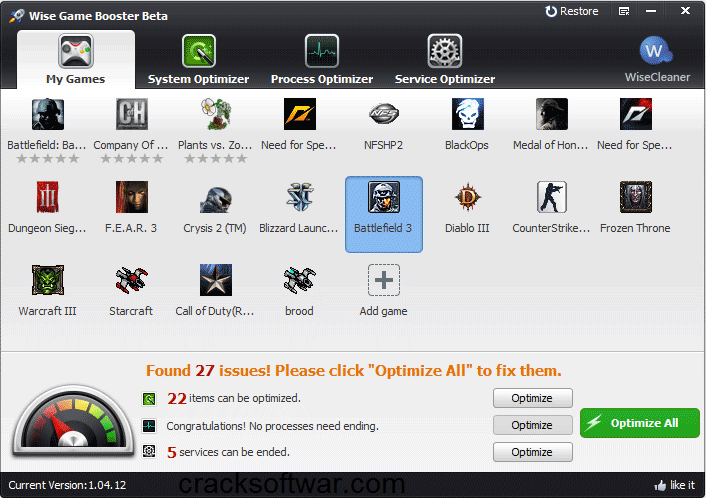
The user-friendly interface is divided into multiple panels, allowing quick access to key features.
In the first area, you can ask Wise Game Booster to automatically search for installed local games on your computer and add them to the list for analysis.
Game information for each listed item includes the game type, file name, developer, runtime, last played, rating, and notes.
At the bottom of the screen, Wise Game Booster displays initial data about optimizing items, as well as terminating processes and services to free up memory.
Regarding the system, you can make Windows Explorer run as a separate process to avoid system conflicts, automatically restart it to prevent unexpected desktop disappearance, and enhance the responsiveness of foreground applications. It is possible to terminate currently active processes and services from the last two sections.
The application uses low to moderate memory and low CPU, has a good response time, and applies changes quickly. No error dialog boxes were displayed in our tests, and the tool did not crash or freeze. Overall, Wise Game Booster is user-friendly when you want to optimize system settings for running video games.
Overview of Wise Game Booster Benefits
This program doesn’t perform miracles, but it will help extract every bit of performance from your system and run games more smoothly by terminating unnecessary programs and services it identifies. This way, your computer will allocate more system resources to the game you are playing. It’s simple yet highly effective.
In the Process Optimizer and Services Optimizer sections, it allows advanced users to manually terminate processes or stop services, and of course, it will provide helpful suggestions regarding all these processes. Sometimes, stopping a particular service can affect performance or device operation. To ensure safety, the service can be restarted to revert to the state before use.
A Simple Yet Effective Game Booster
Wise Game Booster is designed to enhance your gaming experience. It can instantly boost your computer's performance by optimizing system settings, terminating unnecessary programs, and stopping irrelevant services with a single click, allowing your system resources to focus solely on the game you are playing.
Add Games to Wise Game Booster
You can add your games to "My Games," so you don’t have to search for them among cluttered desktop icons. Here, you can manage your games and check game information.
Stabilize and Speed Up Your System
The system optimizer in the tool enhances relevant system settings to improve system stability and speed, putting the computer into gaming mode.
Terminate Unnecessary Processes and Irrelevant Services
The application doesn’t perform miracles but will help extract every bit of performance from your system and run games more smoothly by terminating unnecessary programs and services it identifies. This way, your computer will allocate more system resources to the game you are playing. It’s simple yet highly effective.
Manual Optimization Suggestions and Service Resumption
In the Process Optimizer and Services Optimizer sections, Wise Game Booster allows advanced users to manually terminate processes or stop services, and of course, it will provide helpful suggestions regarding all these processes. Sometimes, stopping a particular service can affect performance or device operation. To ensure safety, the service can be restarted to revert to the state before use.
Technical Details and System Requirements
Supported Operating System: Windows 7/8/10
Processor: Pentium 4 or higher
RAM: 1 GB of RAM (2 GB recommended)
Free Hard Disk Space: 200 MB or more

 File Name:
 Downloads:
 Version:
 Full Version:
 Created By:
 License Type:
 Release Date:
 Languages: