


- Display Changer II has been updated to the latest version: Display Changer II 1.8.1.136
Overview of Display Changer II
It changes your Windows screen resolution, runs a program, and then restores the original settings. This is useful for gaming and home theater PCs. If you're tired of manually adjusting Windows display settings.
I created this application because many programs perform better at specific resolutions (for example, 640 × 480 with 8-bit color depth or 1920 × 1080 at 24 Hz refresh rate).
This program temporarily or permanently changes your Windows desktop display, height, color depth, refresh rate, and rotation (via a configuration file).
If you frequently play video games or have a home theater PC, there's a good chance you want to reduce the resolution when playing or watching a movie. Display Changer II is a lightweight utility designed to help you set a custom resolution for specific applications, both temporarily and permanently.
The idea behind the program is to provide you with options to change the resolution even when the configuration is not provided by default. It not only allows you to switch to a custom resolution, but there's another noteworthy feature: you no longer have to hassle with changing the settings manually.
In fact, the developer stated that the tool was created so that the resolution can be adjusted automatically. To achieve this, the application relies on existing configuration files and modifies them accordingly, so you don't have to do it manually. It goes without saying that you can test the resolution and see if it fits your preferences before applying the changes.
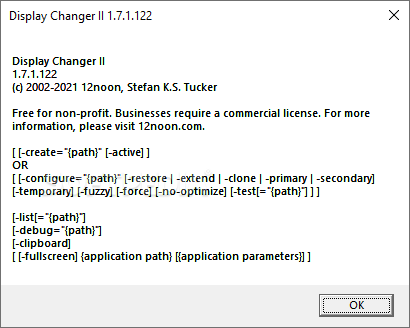
Features of Display Changer
- Changes Windows display resolution
- Useful for gaming and home theater PCs
- Temporarily and permanently change display, color depth, height, refresh rate, and rotation
-
When playing with game video settings and some applications, you may have noticed that there is always a recommended resolution. While it's true that your hardware can support a better device, these applications are generally designed to work best with the recommended option. In addition to the actual resolution, the tool also allows you to make adjustments to color depth, refresh rate, height, and width.
Overall, Display Changer II can be beneficial for anyone needing a different resolution for specific applications that may perform better at a certain resolution. At the same time, the program can be useful when trying to rearrange screens in a multi-monitor setup.
Technical Details and System Requirements
- Supported Operating Systems: Windows 11, Windows 10, Windows 8.1, and Windows 7
- RAM: 2 GB of RAM (4 GB recommended)
- Free Hard Disk Space: 200 MB or more

 File Name:
 Downloads:
 Version:
 Full Version:
 Created By:
 License Type:
 Release Date: