

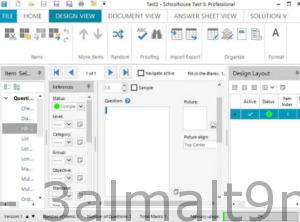
Schoolhouse Test Professional Enterprise 6.1.187.0 Free Download - 3almalt9nia
Free Download Schoolhouse Test Professional Enterprise 6.1.187.0 Full Version - Test creator for printable tests, quizzes, and exams.
Overview of Schoolhouse Test Enterprise Edition
Schoolhouse Test Enterprise. Creating and printing paper-and-pencil tests has never been easier. Schoolhouse Test simplifies the time-consuming task, making the results more professional. Some of our clients have even hinted that creating tests with Schoolhouse Test can be enjoyable. If you're looking for a professional test generator that quickly creates paper-and-pencil tests, Schoolhouse Test is the right software for you.
Now, version 5 takes test creation to the next level. Schoolhouse Test 5 offers a high-resolution display, multi-part questions, expanded references, an improved print manager, assembly, solution view, and much more.
You can download Schoolhouse Test Professional from our software library for free. Creating and printing tests or quizzes has never been easier. Schoolhouse Test significantly simplifies the time-consuming routine and delivers much more professional results. Some of our clients have even suggested that creating tests with Schoolhouse Test can actually be a fun process. If you're searching for a professional test creator that quickly produces paper-and-pencil tests and quizzes, Schoolhouse Test is the software for you.
Now, version 5 takes test creation to the next level. Schoolhouse Test 5 provides a high-resolution display, multi-part questions, expanded references, an improved print manager, assembly, solution view, and much more.
Features of Schoolhouse Test Pro
- Create tests, quizzes, and exams with hundreds or even thousands of questions.
- Document view allows you to activate and deactivate test items with just a click of a checkbox.
- Document view lets you assign and display marks for each question in your test.
- Document view provides an automatic reminder to back up your work, an invaluable feature if your computer is prone to power outages.
- Document view lets you select alternate letters for multiple-choice answers to meet formatting standards set by some U.S. educational bodies.
- Document view allows you to customize questions and answers using superscript, subscript, bold, italic, and underline for words, phrases, or entire text blocks.
- Document view lets you set custom font styles for the entire test or quiz from a general fonts dialog box.
- Document view offers ribbon navigation for easier access to frequently used features, eliminating the need for drop-down menus that hide features and are hard to handle.
Document view lets you add an image or logo to the title group (first page header) for both the test document and answer sheet.
Document view allows you to set a level and category for each question and use these filters to select questions for your tests and quizzes.
Document view lets you use the diagram question type to provide an image to be labeled or create a space in the test or answer sheet for diagrams to be drawn.
Document view offers a fill-in-the-blanks question type to identify parts of words, phrases, or entire sentences. Double-click a word to remove it from the text or click the "Select" button.
Document view lets you use images for answer choices in multiple-choice, matching, and ordering questions. Or use a combination of text and image for answers.
Document view allows you to add a page break and choose to let a question and its answer span multiple pages if necessary (uncheck Keep Together for the question to extend beyond one page).
Document view provides standard find and replace to quickly locate questions with specific terms and easily replace words or phrases throughout the test or quiz.
Document view lets you copy and paste mathematical equations from Microsoft Word or MathType as resizable images.
Document view allows you to make any question a sample question by setting the marks value to 0. A sample question will not be assigned a question number.
Document view's design editor permits multiple fills and adjustments for marks, level, category, and activation.
Schoolhouse Test Professional Portable is a useful and well-known program in the field of test and exam question design. If you're someone working in education, this test and exam question design software can be beneficial for you. Testing is a traditional and suitable way to assess students' abilities in educational settings. You no longer need to spend hours on tabs and paper to design test questions! With this software, you can finally design and format exam-related questions. At the end of each course, teachers are required to assess their students and evaluate their proficiency levels. This program allows your teachers and instructors to design test questions and quizzes in various ways and print them quickly. The software comes with a pre-prepared template, reducing the time spent on question and quiz creation, allowing you to focus on crafting the right questions for the test.
- Ability to create multiple-choice questions for general and memorization courses
- Ability to create "fill-in-the-blank" questions
- Access to a pre-prepared template for question creation
- Ability to create true/false questions
- Ability to enable and disable test questions using a checkbox
- Ability to change text fonts.
- Ability to write words in bold or underline them
- Ability to copy/paste mathematical equations from Office programs and more...
Programs you might like:
Download All About PDF with Activation
Download Wondershare PDFelement Full for PC with Activation Crack
Download PDF Eraser Pro Full with Activation Latest Version | PDF Eraser Pro
Infix PDF Editor Pro Latest Version Full with Activation Crack
Reduce PDF File Size – ORPALIS PDF Reducer Professional Full with Activation

 File Name:
 Downloads:
 Version:
 Full Version:
 Created By:
 License Type:
 Release Date:
 Languages:
 Tags:
