


Debenu PDF Tools Pro is a Windows application that simplifies working with PDF files. It's user-friendly and allows you to preview and edit PDFs, merge and split files, crop and rotate pages, extract form field data, edit JavaScript, convert PDF to text, convert images to PDF, add text stamps, manage metadata and digital signatures, and much more. It even supports custom scripting as if it were built-in features.
You can fully automate your PDF workflow by creating a monitored folder and applying actions. The functionality of the monitored folder can be extended to Dropbox, giving you the ability to do this from any Dropbox client.
It's a standalone solution that doesn't require the installation of Adobe Acrobat or any other PDF software, and all functions are available directly in Windows Explorer.
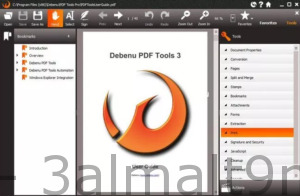
Features of Debenu PDF Pro
Windows Explorer Integration
New! You can simply right-click on a PDF file in Windows Explorer and use any of the tools or actions to process the selected files. It's easy to use and allows you to preview PDFs, merge and split files, crop and rotate pages, extract form field data, modify JavaScript, convert PDF to text, and much more.
It includes continuous page view, bookmark navigation, and text selection. It can be used to apply action lists and procedures while viewing PDF files.
Splitting and Merging PDF Files:
It offers two different methods for merging PDF files and a set of features for extracting pages from a PDF file into separate files.
Stamping and Watermarking PDF Files
Add text, numbers, and images anywhere on the page, including behind and in front of the current page content. Apply stamps to multiple pages and many PDF files at once.
Converting Images to PDF and PDF to Images
Each image is converted into its own PDF, which can then be merged into a single PDF using the PDF merge action. You can convert to image formats such as BMP, TIFF, JPEG, PNG, GIF, WMF, and EMF.

 File Name:
 Downloads:
 Version:
 Full Version:
 License Type:
 Release Date:
 Languages:
