Description of Microsoft Malicious Software Removal Tool
The Microsoft Windows Malicious Software Removal Tool helps eliminate malware from computers running Windows 10, Windows 8.1, Windows Server 2012 R2, Windows 8, Windows Server 2012, Windows 7, Windows Vista, and Windows Server 2008.
Microsoft releases a new version of the Malicious Software Removal Tool each month. Once downloaded, the tool runs a scan on your computer to check for specific common malware infections (including Blaster, Sasser, and Mydoom) and helps remove any infections found.
This article provides information on how this tool differs from antivirus products, how you can download and run it, and what happens if it detects malware on your computer. The advanced user section includes details for IT administrators and additional information on managing and operating the Malicious Software Removal Tool.
The Microsoft Windows Malicious Software Removal Tool scans computers running Windows 10, Windows 8, Windows XP, Windows 2000, and Windows Server 2003 for specific common malware infections - including Blaster, Sasser, and Mydoom - and helps remove any infections found. After the detection and removal process is complete, the tool displays a report detailing the results, including any malware detected and removed.
Microsoft releases an updated version of this tool on the second Tuesday of each month, and as needed to respond to security incidents. The tool is available from Microsoft Update, Windows Update, and the Microsoft Download Center.
Note: The version of the tool provided by Microsoft Update and Windows Update runs in the background and reports if any infections are found. If you wish to run this tool more than once a month, use the version available on this webpage or install the version available in the "Download Center".
Since computers can appear to operate normally when infected, Microsoft recommends running this tool even if your computer seems fine. You should also use updated antivirus software to help protect your computer from other malware.
The Microsoft Malicious Software Removal Tool is an anti-malware utility that scans Windows computers for specific malware infections.
These infections include Blaster, Sasser, and Mydoom, and it helps remove the malware and any other infections found.
After the malware detection and removal process is complete, the tool displays a report detailing the results, including any malware detected and removed. For direct scanning and protection, consider downloading Malwarebytes.
The Microsoft Windows Malicious Software Removal Tool scans versions of Windows 10, 8.1, Windows Server 2012 R2, Windows 8, Windows Server 2012, Windows 7, and Windows Vista on computers and helps remove specific common malware infections - including Blaster, Sasser, and Mydoom. After the detection and removal process is complete, the tool displays a report detailing the results, including any malware detected and removed.
This tool scans your computer for specific common malware infections (including Blaster, Sasser, and Mydoom) and helps remove the infection if found. Microsoft will release an updated version of this tool on the second Tuesday of each month. The Microsoft Malicious Software Removal Tool (MMSRT) 64-bit is an excellent anti-spyware tool for Windows computers!
This tool is not a substitute for an antivirus product. To help protect your computer, you should use an antivirus product.
Microsoft Malicious Software Removal Tool - is a utility for detecting and removing malware. It thoroughly scans your computer to identify infiltrated malware and attempts to remove it if found. Keep in mind that it is not designed to prevent malicious threats, but to detect existing ones.
Although available as a separate download, Microsoft also distributes it automatically as part of the Windows Update service. In other words, you can run the tool without downloading it by using the run command or cmd utility by typing "mrt.exe".
The Microsoft Malicious Software Removal Tool is an anti-malware utility that scans Windows computers for specific malware infections.
The Microsoft Malicious Software Removal Tool or MSRT scans Windows computers for common malware infections and removes them. MSRT is not a replacement for antivirus or anti-malware products, but it is designed to be a supplementary tool that helps clean infected systems. The Microsoft Malicious Software Removal Tool targets specific prevalent malware families. These infections include Blaster, Sasser, and Mydoom, and it helps remove the malware and any other infections found.
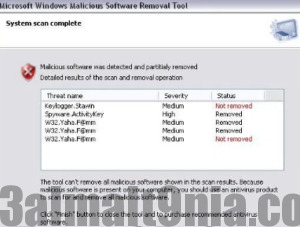
After the malware detection and removal process is complete, the tool displays a report detailing the results, including any malware detected and removed.
Features of Microsoft Malicious Software Removal Tool
After the detection and removal process is complete, the tool displays a report detailing the results, including any malware detected and removed, if any.
* The Windows XP version of the Malicious Software Removal Tool will continue to be provided and automatically delivered through Windows Update and available for download via the 'Download Center'
Step-by-Step Approach
• The Microsoft Malicious Software Removal Tool operates like a wizard and guides you through each step of the detection algorithm. In the first window, you can view a list of spyware that the application can remove.
Different Scan Modes and Reports
• The next window allows you to choose the type of scan you wish to perform. The quick mode takes only a few minutes to complete, while the full scan takes longer but is more thorough.
• If you want to scan a specific folder, use the custom scan mode. Once the process is complete, a detailed report is displayed containing any detected malware, if any.
Bottom Line
• In conclusion, the Microsoft Malicious Software Removal Tool is a go-to solution if your computer is infected. It has been upgraded and promoted as one of the best malware removal utilities, but don't take their word for it until it also fixes your computer. Due to its overall simplicity and wizard-like graphical user interface, this application can be easily mastered by all types of users, regardless of their experience level.
• The Microsoft Malicious Software Removal Tool operates like a wizard and guides you through each step of the detection algorithm. In the first window, you can view a list of spyware that the application can remove.
Different Scan Modes and Reports
• The next window allows you to choose the type of scan you wish to perform. The quick mode takes only a few minutes to complete, while the full scan takes longer but is more thorough.
• If you want to scan a specific folder, use the custom scan mode. Once the process is complete, a detailed report is displayed containing any detected malware, if any.
Bottom Line
• In conclusion, the Microsoft Malicious Software Removal Tool is a go-to solution if your computer is infected. It has been promoted as a malware removal utility, but don't take their word for it until it also fixes your computer. Due to its overall simplicity and wizard-like graphical user interface, this application can be easily mastered by all types of users, regardless of their experience level.
Unzip Password: 123
You might also like
Download and activate CCleaner fully with serial and crack
Download CleanMyPC fully activated

 File Name:
 Downloads:
 Version:
 Full Version:
 Created By:
 License Type:
 Release Date:
 Languages:
 Tags:
Tags: