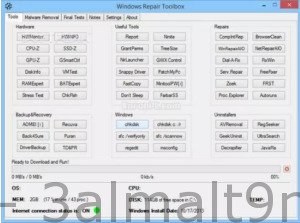
Our software library offers a free download of Windows Repair Toolbox. This program is designed to help you fix Windows systems by streamlining the process, making it faster, easier, and more organized with this tool.
Windows Repair Toolbox provides numerous options, but it depends on your understanding of what each one can do. Is it better to use Complete Internet Repair, or Windows Repair All-In-One, for instance? Dial-A-Fix, or FixWin? Zoek, or the Farbar Recovery Scan Tool? Hmm...
If you're experienced and a problem solver, this program can make the process of fixing your computer a bit easier. However, since Windows Repair Toolbox is portable, it's completely safe to try. (Except for the chance of applying the wrong fix, of course.)
Windows Repair Toolbox includes most third-party applications and utilities you might need to resolve any Windows issues in one small application. A tutorial video is available.
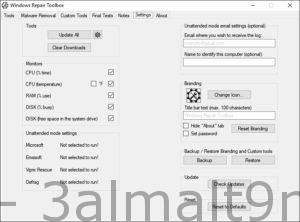
It's divided into categories for tools, malware removal, tests, notes, and settings. When needed, the program will download what it requires and can optionally run many tools in an unattended mode.
Of course, you can download any of these tools individually or another similar third-party program based on ISO, but these programs are only as good as their updates. And since these downloads come directly from the homepage, you always have the latest version and only what you need.
Another great feature any tech will appreciate is the links to Windows utility tools, including chkdsk, MSConfig, Regedit, and many more. Sometimes you get stuck on a repair task, and seeing one of these tools might jog your memory.
If there's one complaint, it's that there are some tools I'd like to add and some I'd remove, but this is mostly personal preference, so I don't see any issue getting the job done with most of the tools chosen. Of course, it knows you can't please everyone, so it uses the slogan "(Almost) everything you need to fix Windows issues in one small, easy-to-use tool."
Windows Repair Toolbox is a development that will solve almost all Windows problems. A portable version is available in the repository, and according to the launch folder, it will be created in the program files folder, but upon closing, everything will be deleted.
Utilities that can diagnose and fix a number of issues in your Windows video at the same time. All tools are divided into categories. In the tools section, you can view a list of programs, click on the program, download it, and run it, and the most suitable version for your Windows version will be downloaded. The program is marked with a letter indicating that we will need to install it, and there will only be three of them, while the other programs, as I understand, are portable and will be deleted once the program is closed.
Windows Repair Toolbox will display essential information about the computer, such as CPU temperature, the amount of free RAM space on drive C, etc., and you'll be able to run the script after finishing repairing your computer. You can save repair notes to know when and what you did the first time. You'll have one-click access to the handy Windows toolbar. The trace error repair option will automatically remove malware by cleaning and restoring the system and defragmenting the disk.
Features of Windows Repair Toolbox
- Download and run the best free portable programs instantly when it comes to diagnosing and solving several types of Windows issues. Tools are categorized by function, and the program will automatically download the correct version for the Windows version you're working in. When finished, simply uninstall the tool, and all downloaded programs are removed. Note: There are 3 non-portable tools, marked with [i] (meaning "installer"). Windows Repair Toolbox is a small portable tool that makes it easy to find and fix many common Windows issues. The program doesn't have any real troubleshooting technology on its own. Instead, it acts as a simple front-end for many third-party utilities and Windows commands. The Tools tab, for example, offers buttons for HWMonitor, HWiNFO, CPU-Z, GPU-Z, Ninite, PatchMyPC, Snappy Driver, Autoruns, Process Explorer, FixWin, Recuva, Geek Uninstaller, chkdsk, sfc, Regedit, and more. Windows Repair Toolbox doesn't come bundled with any of these, fortunately. Instead, when you click on something like Recuva, the program goes online, downloads the correct portable version for your OS, and then runs it on your behalf. The Malware Removal tab offers a little more functionality. Besides providing one-click access to many popular malware scanners - Emsisoft, Malwarebytes, Kaspersky, Microsoft, RKill, RogueKiller, AdwCleaner, Hitman Pro, and more - you can run unattended repairs using multiple programs.Other malware-related options include a selection of update links (Windows, Java, Flash, Adobe Reader) and a few cleaning and repair tools (CCleaner, WinRepairAIO).
The Final Tests tab offers some quick common system checks. Is Flash or Java installed? Does your system open many common file types: Office, MP3, PDF, and more? What's in your HOSTS file? Are your webcam and microphone working? Answers might be just a click or two away.
You can save notes about your actions, which might be useful if you regularly run the program on others' systems, and there's also an option to email the activity log to your Gmail address.
The fantastic digital voice recorder in. Its tutorials and discussions on YouTube make learning about the program simple, and its interface is user-friendly and straightforward. The application harvester key is typical for users or owners trying to use a full audio work platform to get more information about building and music production tasks.
- Displays relevant information about the computer to be repaired: CPU temperature, name, and usage percentage; the amount of RAM installed on the system and usage percentage; the amount of free space left in the C: partition; Windows version and installation date.
- Allows you to perform quality assurance tests after the repair is complete;
- Allows you to save notes about the repair process;
- Provides one-click access to some useful Windows tools (chkdsk, sfc, regedit, msconfig);
- The "unattended repair" option automatically performs: malware removal, system cleaning and repair, and disk defragmentation. An email can be sent to notify you that the automatic repair process is complete, containing the logs.
Password for extraction: 123
You can also download
- Advanced SystemCare Ultimate for comprehensive Windows maintenance and repair, activated
- IObit Malware Fighter for robust protection against ransomware and spyware, activated
- Driver Booster PRO for the fastest and best program to find computer drivers online + activation
- Advanced SystemCare Pro for Windows maintenance and removing files that slow down the system
- Smart Defrag for powerful and effective disk defragmentation and speeding up the hard drive
- IObit Protected Folder for protecting files with strong, unbreakable passwords

 File Name:
 Downloads:
 Version:
 Full Version:
 Created By:
 License Type:
 Release Date:
 Languages:
 Tags:
Tags: