

Download Photo Editing Software 2025 - ON1 Photo RAW
ON1 Photo RAW has been updated to the latest version: ON1 Photo RAW 2025.1 v19.1.0.16236
Description of ON1 Photo RAW
ON1 Photo RAW 2025 addresses the essential photo editing needs of photographers, streamlining the workflow to be both powerful and straightforward.
Photo RAW 2025 includes significant updates for both performance and image quality, along with important new features such as layer integration, new layered file features including automatic alignment and focus stacking, a new vertical tab, a new text tool, new updates for digital asset management, and support for new cameras and lenses.
ON1 Photo 2025 provides the professional tools photographers need to achieve professional results, all within a well-designed photography workflow application.
It offers photographers the features they use most from both Lightroom® and Photoshop® in a single application.
You can quickly create straight, mirrored, or rounded glowing masks that can be re-edited and blended using brush masks. Now you can combine the sensitive color power we created for the perfect brush with gradient masks. When enabled, it detects the color beneath the gradient and applies the mask only to the adjustable color range. This makes it easy to hide areas like the sky while keeping elements like buildings or trees that extend into the sky.
Features of ON1 Photo RAW
ON1 Photo 2025 includes the tools photographers need, all within a well-thought-out photography workflow application.
Fast browsing, organizing, and batch processing.
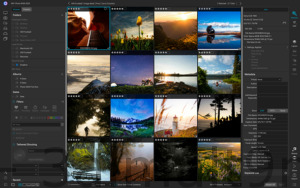
Quickly browse, organize, manage, and index images in your photo editing workflow. The ultra-fast image viewer and organizer are perfect for rapid viewing and scrutinizing images without waiting for previews to create or import.
ON1 Photo RAW 2025 includes the essential tools and features every photographer needs in their workflow. Our advanced, ultra-fast, non-destructive processing engine provides a seamless and highly efficient editing experience.
ON1 Photo RAW focuses on allowing you to get the most out of every image. Photographers now have a fast image management engine, hundreds of customizable photo effects, beautiful and fast HDR, selection and masking tools, layers, and more in one application. You can quickly browse, organize, manage, and index images in your photo editing workflow. The ultra-fast organizer and manager are perfect for quickly displaying and removing images without waiting for a preview to create or import.
Features of ON1 Photo RAW
New Layer Workflow
Layer integration is at the heart of ON1 Photo RAW 2025, allowing for raw processing on multiple primary images while maintaining all settings for each image, all within a single workflow.
RAW Processing and Editing
A modern processing engine provides a fast, smooth, convenient, and enjoyable photo editing experience while delivering high-quality results for your images.
System Requirements:
Windows 7 or Windows 8 or Windows 10 (current maintenance releases, 64-bit only)
Optional Application Integration:
Optional integration with Photoshop CS6 and above
Photoshop Elements 14 and above
Photoshop Lightroom Classic 6 and above
New Custom Brush Shapes
Brush cleaning has taken a leap forward in control and creativity. You can now choose from a variety of custom brush shapes or even import your own.
New Additional Support for Affinity Photo and Corel PaintShop Pro
You can now expand your workflow in Affinity Photo and Corel PaintShop Pro by accessing Develop, Effects, and Portrait within the applications you use. Capture One support coming soon!
New Fast Slideshow
Need to quickly present your images to a client? With the fast slideshow, you're just one click away from a full-screen slideshow with user-adjustable delay and a sleek transition solution.
New Camera-Based Presets
You can now automatically apply a preset to any new images from a specific camera. If you find yourself always making the same adjustments, just create a preset and apply it automatically to images from that camera. This is extremely useful if you've created a custom camera profile or if you've converted the camera to infrared.
New Color-Sensitive Gradient Masks
Everyone knows how powerful the gradient mask tool is. You can quickly create straight, mirrored, or rounded glowing masks that can be re-edited and blended using brush masks. Now you can combine the color-sensitive power we created for the perfect brush with gradient masks. When enabled, it detects the color beneath the gradient and applies the mask only to the adjustable color range. This makes it easy to hide areas like the sky while keeping elements like buildings or trees that extend into the sky.
New HDR and Pano Batch Processing
Save time by batch processing HDR brackets or panoramic images. Just organize the brackets into subfolders, then let the browsing build the new HDR and panorama for you. This is a lifesaver for real estate shooters.
New User Interface Enhancements
We have taken a thoughtful approach to updating the user interface. Based on user feedback, we have improved common controls like sliders for more precision and longer label space so we can be more descriptive. We also ensured that the "Layers" and "Edit Module" tabs do not move too far from view on a small screen or when you have a large set.
- Quickly add drag to your dull skies
- Auto-tune a full image for photography
- Create stunning sunsets in seconds
- Showcase your images in all their beauty
- Refresh smiles in just a few simple clicks
- Edit selectively like never before using color selection
- A better way to remove unwanted distractions
- Find your duplicate images in seconds
- Easily change the colors of objects in your images
- Quickly find all images from your favorite location
- Make eyes pop in seconds
- The best Photoshop add-on for photo editing
- Present images to your clients
- ON1 Photo RAW 2025 includes the best masking toolkit for beginners and advanced users, whether replacing backgrounds or skies, applying masks, or making selective adjustments.
- It includes hundreds of fast, non-destructive filters and effects that are foldable, editable, and customizable for endless creative possibilities.
- Tone mapping and exposure blending has never been faster or easier.
- Easily merge multiple images into a panorama or a single matrix. Automatically align images smoothly and blend them together.
- ON1 Photo RAW 2021 includes everything you need to resize, export, and print your images.
- We have integrated all our modules to create a single place for your adjustments. Different editing modules are now available as tabs to allow you to work seamlessly at the same time.
- Classes will no longer be a separate module. Instead, the power of categories can be accessed within the non-destructive workflow under Develop and Effects.
- New AI-powered algorithms will allow customers to transfer images edited by Lightroom, maintaining their non-destructive settings and converting them to ON1 Photo RAW 2021.
- Perfect for creating stickers or adding your own borders or captions for editing. Easily control font size, color, position, and more, then save it as a preset to quickly add similar text overlays to a batch of images.
- You can now see all the keywords you use in a single searchable list. You can quickly apply, remove, modify, or delete keywords.
- With the new powerful non-destructive layers, you can combine images, texts, or alternative exposures with HDR images. You can also use powerful masking tools to combine multiple HDRs.
- Makes
- The new Portrait tools will automatically detect faces in your images and refine them to smooth skin, brighten and sharpen eyes, and whiten teeth.
- Overall contrast has been reduced to enhance the image, along with a new line to help increase readability. New icons, tabs, and sliders will also take up less visual space.
- Blend multiple shots at different focal distances to increase depth of field.
- Easily merge multiple images into layers, then automatically align them based on image content.
- Local adjustments will be updated to use raw processing data. This allows for more highlight and shadow detail with a wider color range.
- We have added filter particles, curves, and color adjustment filters specifically for effects. There is also a new way to select and browse filters.
Programs You Might Be Interested In:
- Download Illustrator 2022 – Adobe Illustrator 2022 with Activation
-
Download Photoshop 2022 Full with Activation – Adobe Photoshop 2022 with Activation
-
<a href="https://3almalt9nia.com/%d8%aa%d8%ad%d9

 File Name:
 Downloads:
 Version:
 Full Version:
 Created By:
 License Type:
 Release Date:
 Languages: