

USB Raptor: A Program to Lock and Unlock Your Computer with a USB Flash Drive
Protecting your data is crucial, and it's great to have a way to secure your computer from prying eyes when you're away. With USB Raptor, you can use a flash drive as a key to lock and unlock your computer. Once you set up the flash drive, your computer will lock automatically whenever you remove it, and unlocking it is as simple as plugging the drive back in.
USB Raptor works by writing a special unlock file to the designated drive, which is encrypted. The program continuously checks for this file, and if it can't find it, it automatically shuts down your computer. The locking and unlocking processes happen automatically, meaning you only need to connect your USB drive to lock or unlock your computer.
The program's interface offers straightforward and easy-to-access configuration options. You'll need to set a password for your chosen USB drive, after which the program creates the lock file necessary to keep your computer unlocked. You can also set a password to access the program's interface for added security, preventing anyone who accesses your computer with the connected USB drive from changing the settings or password.
You can use either USB Raptor's locking mode or system lock modes. You can configure it to lock your computer by selecting and changing the lock screen color at specified intervals. Additionally, you can set the number of seconds you want to elapse before your computer locks, and you can unlock it during this timeframe to avoid unwanted locks.
You can enable or disable two other methods for unlocking your computer. You can set a password to type on the lock screen or the option to send a private network message to unlock the system.
USB Raptor supports all types of USB flash drives.
Features of USB Raptor:
Automatically lock/unlock Windows using common USB flash drives
Compatible with all types of USB flash drives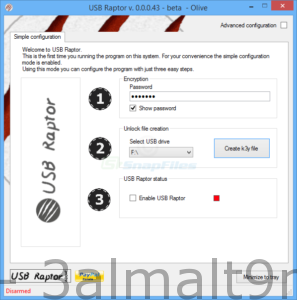 Well-designed
User-friendly
High-security option to verify the serial number of the flash drive
Various alternative unlocking methods
Supports LAN locking
Simultaneous locking and unlocking for multiple computers on a local network
Supports serial command integration (trial phase)
Tray icon application
Option to delay and unlock, to avoid unwanted locks
Compatible with Windows 10, Windows 7, Windows 8, and Windows XP (also compatible with Windows Vista)
Multi-screen systems supported
Logging file
Main support
Stealth user access options
The key can be unique for each system

 File Name:
 Downloads:
 Version:
 Full Version:
 Created By:
 License Type:
 Release Date:
 Languages: