

Easy2Boot Overview
Download Easy2Boot
Download Easy2Boot 2025 Full Version
Easy2Boot USB has been updated to the latest version: Easy2Boot 2.21
Easy2Boot USB - a new multifunctional USB solution with great capabilities! Easy2Boot can do all these things - new! Easy2Boot now supports multi-boot UEFI (Linux and Windows operating systems). + No "Helper" USB flash drive is required for Windows installations. Download Easy2Boot for PC
Easy2Boot is a highly configurable free multi-boot program with a USB drive that supports secure boot for UEFI. It is one of the most useful bootable media tools, being small and fast.
The downloadable application allows you to create a multi-boot USB on a standard USB flash drive, but it also supports external USB drives (both SSDs and hard drives). There are many videos on YouTube, a quick setup guide, and plenty of other information like the Easy2Boot forum, FAQ section, blog, and three eBooks for developers.
Easy2Boot Review
The demands of expert software users are always increasing today. Whether you're an IT professional working with a variety of clients or a savvy hobbyist, having a multi-boot USB makes the task much easier. There are dozens of multi-boot USB tools on the market, but one of the best is Easy2Boot available at www.easy2boot.com. Let's take a detailed look at what makes Easy2Boot one of the best applications for setting up and maintaining a multi-boot USB.
What is MultiBoot USB
Let's start with the basics. A multi-boot USB tool is a software application that turns an everyday USB stick into a Swiss Army knife for tech enthusiasts. Multi-boot USB drives allow users to run multiple bootable programs and operating systems from a single USB drive. These programs and operating systems run without needing to be installed on the computer you connect it to. This means you can run programs and test or repair systems safely without leaving any trace on the host computer.
Why You Want a MultiBoot USB
There are many reasons to use a multi-boot USB tool where programs you can run exist! The most common is the need to boot into a wide range of operating systems. If you ever need to try a specific Linux distribution or install Windows, this will be the most time-efficient way to get it done. It's much easier than installing and dual-booting dozens of operating systems or, I shudder at the thought, swapping hard drives for a custom OS hot swap!
Other reasons to use a multi-boot USB are for those interested in the more clinical side of computing. If you work in IT, penetration testing, or system recovery, having a multi-boot USB is essential. These tools allow you to run any number of programs without "touching" the host computer. So if you have a device that won't boot, has been crushed by malware, or you're troubleshooting, you'll find a multi-boot USB tool right in its place!
With all that aside, let's dive into why Easy2Boot makes the best multi-boot USB tool!
User-Friendly
Gone are the days of making a multi-boot USB being a huge hassle. You had to install each ISO and Live CD and .bin separately. USB boot loader tools were often finicky and required regular updates to keep them working when new ISO files were released - Easy2Boot helps us bypass all that. With Easy2Boot, all you need to do is perform a one-time installation of Easy2Boot on a USB drive, and then you're done! Really! After that, installing software packages or ISO files is a breeze. You just need to plug in the Easy2Boot USB and drag and drop the program you want (for example, an ISO file) into the correct folders, and you're good to go! Easy2Boot dynamically creates a new boot menu every time you load it, so there's no need for updates on your part. If you want to swap program loads, say you want to replace or add the latest Ubuntu distribution, all you have to do is drag the new files in and drop them, and delete the old files (or leave them and have both!) "Easy" is in its name! Easy2Boot will run 99% of all Linux 'LiveCD' ISO files regardless of the version. Easy2Boot uses the NTFS file system, so you can also store all your files on the same USB drive even if they exceed 4 GB in size.
UEFI Booting
Easy2Boot does not have a UEFI boot menu. If you want to boot UEFI from an ISO file or another payload file, you must first convert it to a .imgPTN partition image file using the MPI Tool Kit (one of the Windows helper tools). Then you copy the .imgPTN file to the E2B USB drive. Using the E2B MBR Legacy boot menu, you can then select any of the .imgPTN files from the Easy2Boot menu. This will then immediately replace the Easy2Boot partition with the contents of the .imgPTN file (you can alternatively use the Switch_E2B.exe utility to switch in any .imgPTN file). Once the .imgPTN file is "switched," you can boot UEFI (even secure UEFI boot) directly from the USB drive. This way, you can have hundreds of secure bootable images from UEFI like Windows Installers, Linux Installers, Linux Live OS, WindowsToGo OS, MemTest86, KonBoot, etc., all on the same USB drive.
What About Updates?
Back in the day, updating a multi-boot USB sometimes meant wiping the current USB drive and rebuilding it. Fortunately, this is not the case with Easy2Boot. The update process with Easy2Boot couldn't be easier to access. When it comes to updating drivers, ISO files, and other program payloads within Easy2Boot mult
Features of Easy2Boot USB Portable
No other MultiBoot USB solution can do all this from the same USB drive!
There is no limit to the number of different Linux and Windows Install and WinPE files, etc. ISO or other payload files
Run almost any "live disk" ISO for Linux - just copy it! Unlike XBOOT or YUMI, you don't have to wait for Easy2Boot to be updated to support a new Linux ISO distribution - Easy2Boot is universal.
Install Windows XP on a system from an unmodified XP, install ISOs (any number of different ISOs) to an IDE SATA AHCI RAID SCSI system - no need to integrate large storage or F6 drivers! It also works with Server 2003 ISOs.
Install from any number of different Windows Vista / 7/8 / SVR2008R2 / SVR2012 operating systems, install ISO files
Boot directly from Linux LiveCD ISOs with persistence - you can have all these (and more) on one Easy2Boot drive and boot them all persistently - YLMF, Ubuntu, Fedora, StartOS, Porteus, pclinuxos, Backtrack5, kali-linux ISOs.
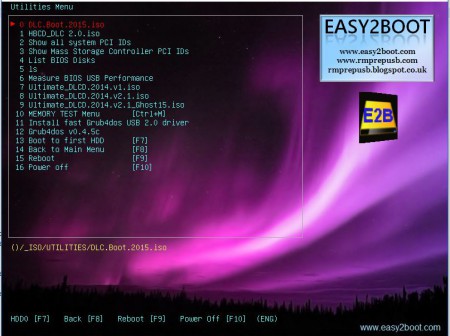
User-configurable and fully documented - you can change the background image, titles, text colors, move the menu position, create your own submenus, issue a sound alert when loading the menu, add your own GFXBoot menu, change the menu font, use UTF-8 non-ASCII characters in the menus, set your own shortcut keys, etc.
You can use FAT32 or NTFS (and with some limitations, an exFAT or ext2 formatted drive).
Since Easy2Boot is not a "helper" tool, you can set up the Easy2Boot drive under Windows or Linux. Once prepared, you can simply copy (or delete) any ISO files you want at any time in the future.
A variety of example "skins" are included.
You may also like
Download the Windows Burning Program on Flash Drive Activated WinToUSB Full Version
Download the best program to protect flash drives from damage and viruses USB Secure with activation
Download the USB Protection Program with Password – GiliSoft USB Lock Full Activated

 File Name:
 Downloads:
 Version:
 Full Version:
 Created By:
 License Type:
 Release Date:
 Languages: