

Movavi Video Editor Plus is a multimedia software that allows you to easily create, play, convert, manage, edit, and share your files. It provides various tools to quickly convert audio and video into different formats, even if you have no prior experience in editing or dealing with complex software. With its simple interface and smart features, you can produce professional-quality videos without any hassle.
Overview of Movavi Video Editor Plus
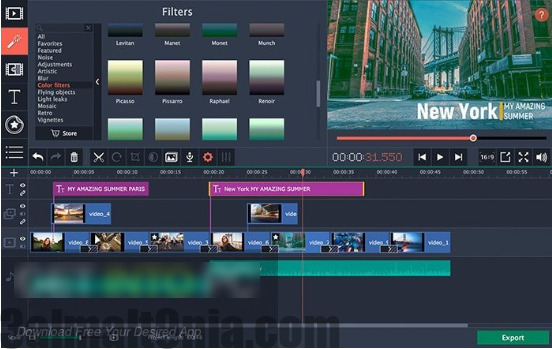
Movavi Video 2025 is a program that offers users various functions and tools for converting video and audio file formats. Movavi Video Editor 2025 supports different file formats, visual effects, music, transitions, animations, filters, and many tools that allow you to easily create a professional and eye-catching video. It supports a wide range of video formats, up to 180 formats. You can also adjust the video size or the speed of the embedded audio. Additionally, you can control different language fonts, animations, text backgrounds, stickers, shapes, icons, and more. The program can upload videos directly to popular video streaming platforms like YouTube, Facebook, Dailymotion, and more.
Features of Movavi Video Suite
Here are some notable features you will experience after downloading Movavi Video Suite for free.
- Automatic speech-to-text conversion for creating subtitles in multiple languages with just one click. You can edit any video clip you want.
- Preview effects (filters, titles, transitions) by hovering the mouse over them without needing to apply them or wait.
- A clear and modern user interface, with enhanced editing tools as the timeline is designed to be smoother and faster to work with.
- The program comes with many ready-to-use effects, making it easy for you to edit and be creative without needing to purchase expensive add-ons or create everything from scratch.
- When adding images or videos or layering them, you can choose a blending mode that suits you from several styles to give your video a different look.
- Remove unwanted sounds like background noise, wind noise, or music background noise to make the audio clearer and purer.

System Requirements for Movavi Video Editor
Before you start downloading Movavi Video Editor, make sure your computer meets the minimum system requirements.
Operating System: Windows XP / Vista / 7/8 / 8.1 / 10.
Memory (RAM): 1 GB of RAM required.
Hard Disk Space: 230 MB of free space required.
Processor: Intel Dual Core or newer.
Additional Features
AI-Powered Automatic Translation
The program provides a powerful tool for speech-to-text conversion and instant, accurate video translation, with easy options to modify the subtitle font and colors.
Live Effect Preview
You can browse filters, titles, and transitions just by hovering the cursor over them, saving you trial time and helping you quickly choose the right effect.
Enhanced and User-Friendly Timeline
The new timeline design makes the editing process smoother, especially when dealing with long or multi-layered projects.
Motion Tracking
Allows you to link texts or images to a moving object within the video so that it follows the motion automatically and realistically.
Background Removal
No need for a green screen anymore, as the program can automatically remove the background and replace it with other backgrounds or images.
Audio Quality Enhancement
The program works to eliminate annoying noise from audio recordings, making the sound clearer and purer.
Comprehensive Effects and Resource Library
Offers thousands of ready-made templates like transitions, stickers, backgrounds, and intros that add a professional touch to any video.
Conclusion
In conclusion, Movavi Video Suite is a solution for anyone looking for easy yet professional editing tools to modify and design professional videos, record screens, and add effects. With its support for artificial intelligence, significant performance improvements, and simple interface, it has become suitable for both beginners and professionals alike. If you want to create high-quality creative content with minimal effort, this program will be an excellent choice for you.
You may also like
- Download Movavi Video Suite 22.4 Full with Activation
- Camtasia 2022 Activated – Download Camtasia Studio for PC Direct Link 100%
- Download Activated Filmora Without Watermark – Wondershare Filmora 11.4.7.358
- Download ZD Soft Screen Recorder with Crack for Creating Tutorials 2021
- Download MAGIX Vegas Pro 20.0.0.139 with Activation

 File Name:
 Downloads:
 Version:
 Full Version:
 Created By:
 License Type:
 Release Date:
 Languages:

One thought on “Download Movavi Video Editor Plus for Windows - Direct Link for Video Editing and Modification”
MERCI BEAUCOU