


(How to find password for any Windows account) How to find the password for any Windows account: There are several ways to find out your current Windows password:
1. Check the hint The administrator password is the password for any Windows account that has administrative access. In newer versions of Windows, such as Windows 11 and Windows 10 and Windows 8 and Windows 7, most basic accounts are configured to be administrative accounts, so the administrator password is often your account password. Not all user accounts are set up this way, but many are, especially if you installed Windows on your computer yourself.
There is also a built-in "Administrator" account in all versions of Windows that acts as another administrative user account, but it usually does not appear on the login screen, and most people are unaware of its existence.
However, if you are using an older version of Windows, such as Windows XP, you may need this administrator password when accessing the recovery console for Windows XP or when trying to boot into safe mode for Windows XP.
There are several ways to find the administrator password in Windows 10:
1. Using the Netplwiz feature:
Press the Windows key + R on your keyboard to open the Run dialog.
Type "netplwiz" and press Enter.
This will open the User Accounts window.
Select the user account for which you want to change the password and uncheck the box that says "Users must enter a user name and password to use this computer."
Click "Apply" and then "OK."
2. Use the Command Prompt:
Press the Windows key + X on your keyboard to open the Power User menu.
Select "Command Prompt (Admin)" from the list.
Type the following command and press Enter:
"net user administrator *"
This will reset the current password to blank.
3. Reset Windows 10 password when forgotten
Download and install the PassGeeker Windows Password Recovery tool.
Connect a USB drive and open the PassGeeker tool to create a password reset disk.
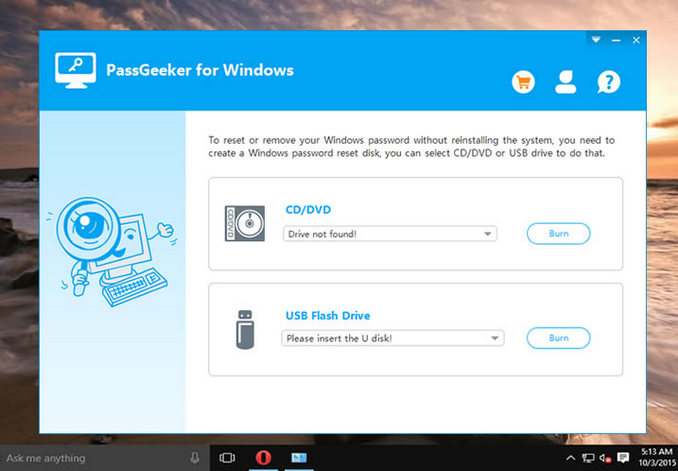
Boot the locked computer from the password reset USB.
Select the account for which you want to find and reset the password.
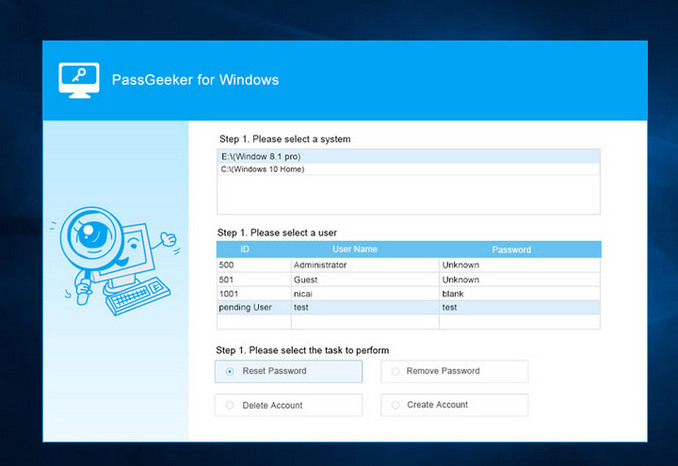
You will log into the computer without any password, after which you can create a new password to log in.
What is the administrator password?
There isn't a one-size-fits-all answer to this question, as the administrator password will vary depending on the system you are using. However, some tips for creating a strong password that is hard to guess include using a mix of uppercase and lowercase letters, numbers, and special characters; avoiding common phrases; and making the password at least 8 characters long. Additionally, it is important to choose a password that is different from your other online passwords and to change it regularly.
How can I bypass the administrator password?
The most common way to bypass the administrator password is to use a program called "Password Recovery." This program will allow you to enter a password you know, and it will attempt to decrypt the administrator password. If successful, you will be able to log into the administrator account.
How can I reset my Windows 10 password without admin rights?
If you are trying to reset the password for a user account that is not an administrator, you will need to use a different method. For example, you can use a password reset disk or you can use the Command Prompt.
What is the default administrator password for Windows 10?
The default administrator password for Windows 10 is "admin." To change the password, open the Control Panel and click on "User Accounts." Under the "Change your password" section, enter the new password in the "New password" field and click the "Change password" button.
How can I find the password for my computer?
If you are looking for your computer's password, there are a few things you can try:
First, check to see if you have a password reset disk or drive; if you do, you can use that to reset your password. If you do not have a reset disk or drive, you can try resetting your password using a Windows installation disk.
Finally, if you are unable to reset your password, you might consider using a professional password recovery service.
How can I find out my current Windows password?
Your password: If you set a password hint when creating your password, it may help you remember your password. To do this, open the Control Panel and click on User Accounts, then click on your account name and click on the "Change password" link. On the next page, your password hint should be displayed next to the "Password hint" label.
2. Use a password recovery tool: If you forgot your password and do not have a hint to help you remember it, you can use a password recovery tool to reset your password. There are many different password recovery tools available; some are free and others are paid.
3. Contact customer support: If you still cannot figure out your password, you may need to contact customer support for your specific version of Windows, and they can certainly help you reset your device's password.
Does resetting the computer remove the administrator password?
No, resetting the computer will not remove the administrator password. If you need to remove the administrator password, you will need to use a third-party password removal tool.
How can I change the administrator password without Admin?
If you are trying to change the administrator password on a computer where you do not have admin access, you will not be able to do so without obtaining admin permission. To change the administrator password on a computer, you must have admin access.
Conclusion
In this article, we discussed how to find the password for any Windows account. The administrator password is required in certain situations, but if you find yourself struggling to remember your password when you need it, there are some things you can do to avoid forgetting it again in the future.
One method many people use to store user account passwords is a password manager; all you need to remember is one password, and you will then find a list of all the hard-to-remember passwords, which can include your Windows administrator password.
Although it is not very secure, you can also do something else to avoid having to type in the administrator password again. To do this, you can set up your computer to automatically log into Windows, so all you have to do is turn on your computer to log in.
You might also like
How to fix error code 0x8004de40 when trying to log into OneDrive
How to fix error 0xc00000e9 in Windows 10/8/7
How to fix the error "Unable to create work file" on MS Office


