

How to fix Snapchat keeps logging you out of the app: Discover quick solutions in this comprehensive guide to address the issue of Snapchat continuously logging you out of your account.
Snapchat has gained popularity in the app world due to its unique security algorithms, along with its distinctive features and regular updates to keep it appealing to users. However, many Snapchat users have reported issues while using it on their devices running Android or iOS. One of the most commonly reported issues is that Snapchat keeps logging out, which can be quite frustrating, but it can be easily fixed. Read on.
Before diving into the solutions, it's important to understand why Snapchat keeps logging you out.
Why does my Snapchat keep logging me out?
The vast majority of Snapchat users do not find it necessary to log out of the app, and since you can't receive messages or notification updates until you log back in, there's really no point in logging out of your account at all. Logging out and back in every time you switch apps can be a major hassle.
However, recently, this is exactly what has been happening to many Snapchat users. They open the app hoping to see their latest snaps, but all they encounter is a screen prompting them to log in.
As the issue persists, it becomes increasingly annoying. Many users have also reported that once they log back into their accounts with their credentials, the app logs them out again immediately.
The issue of Snapchat continuously logging you out could be related to temporary glitches on your phone, outdated apps, storage issues, and so on.
How to fix Snapchat keeps logging you out of the app
This article outlines the most practical fixes for this issue: why does my Snapchat keep logging me out? Of course, you don't need to apply all the solutions below; just try them in order until the app starts functioning normally again.
Solution 1: Simply restart your mobile phone
The majority of issues causing the Snapchat photo app to malfunction are due to processes and apps running in the background. Using Snapchat can lead to many problems if there are any other processes in the background preventing it from communicating with the servers.
There's a chance the app may fail to capture or share snaps at times, and additionally, you may be logged out repeatedly.
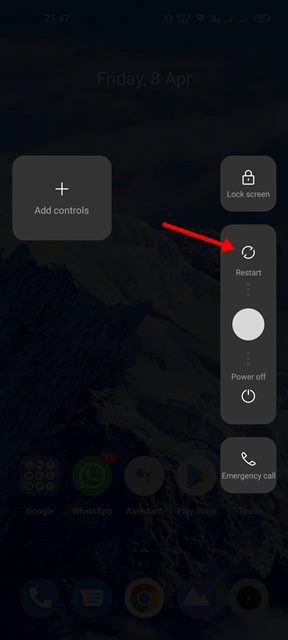
Restarting your mobile phone is a good option to address the issue of Snapchat continuously logging you out on Android and iOS devices. Therefore, the first step to take when dealing with app-related issues is to restart your device; just reboot your mobile phone.
However, if the problem persists, try the next solution.
Solution 2: Remove access for third-party apps
If you've recently linked any third-party apps to your Snapchat account, it's possible that Snapchat has blocked you as a result. You can try revoking access from Snapchat to these third-party apps to see if this resolves the issue.
Continue reading to learn how to fix the problem of Snapchat continuously logging you out by removing access for third-party apps.
Step 1: Start by opening the Snapchat app on your mobile device.
Step 2: Tap the profile icon located in the top left corner of the screen, then to access the settings menu, tap the gear icon in the top right corner of the screen.
Step 3: Navigate to the connected apps section, where you will be able to locate all third-party apps linked to your Snapchat account.
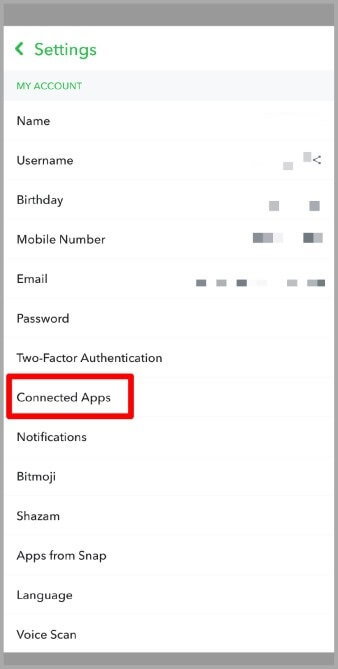
Step 4: After locating the app you want to remove, tap the remove app icon to revoke its permissions.
Solution 3: Clear Snapchat's cache data
Although there isn't a clear link between the app's cache and Snapchat logging users out randomly, it has nonetheless been helpful for many Android users.
Therefore, you can also try fixing the issue of Snapchat continuously logging you out by following these instructions to clear the app's cache.
Step 1: To begin, go to the home screen and long-press the Snapchat app icon until the "App Info" menu appears.
Step 2: Tap on the storage management option that appears in the app info window.
Step 3: Next, on the storage management screen, select the "Clear Cache" option.
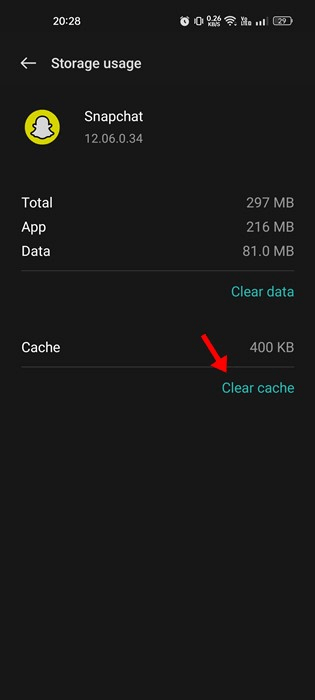
Snapchat clear cache
Once you've cleared the cache, check if the issue of Snapchat continuously logging you out has been resolved. If the problem persists, don't worry and move on to the next set of solutions.
Solution 4: Check for server issues with Snapchat
A server issue could be one of the main reasons for the ongoing logout problems in Snapchat. Like any other app of its kind, Snapchat occasionally experiences server issues.
When Snapchat's servers are down for maintenance, you risk encountering problems while using the app's features.
You have no choice but to wait until the servers are back online if they go down. Once the service is restored, you'll be able to access Snapchat again.
From Snapchat's official portal, you can check the current status of Snapchat's servers, as the site displays the real-time status of Snapchat's servers.
Solution 5: Disable VPN and proxy connections
Try disconnecting from any virtual private networks (VPNs) or proxies your phone may be connected to and see if the app still logs you out.
Snapchat will automatically log you out if it determines that you are using a free VPN connection, as it considers your network unstable. Additionally, it blocks spam and checks for suspicious IP addresses.
Therefore, Snapchat will continuously log you out of your account if the IP address associated through the VPN is deemed undesirable, and the issue will persist if there are any security restrictions in place.
To fix the problem, first disable the VPN or proxy connection.
Solution 6: Check if your Snapchat account is locked
It's possible that Snapchat has disabled access to your account. However, in the vast majority of cases, this occurs when Snapchat detects potentially harmful activity on your account or has reason to believe that your account password has been compromised. When this happens, Snapchat will give you the opportunity to unlock your account whenever you try to log in.
Solution 7: Keep the app updated
It would be a good idea to update Snapchat now if you haven't done so in a while. Older versions of the app can sometimes cause a variety of difficulties, including this issue, among others. In most cases, updating the app can help eliminate any bugs and minor errors that may be causing the problem.
Solution 8: Reinstall the app
If installing the latest version of the Snapchat app doesn't resolve the issue, the problem may be due to corrupted app data. As a result, you may want to uninstall the app and then reinstall it. By doing this, any corrupted data, including cache, will be removed, and you'll start fresh from scratch.
Solution 9: Disable background data
If the above methods did not fix the Snapchat error that keeps logging you out of the app, the next thing you can do to resolve the issue is to disable background data. To do this, you need to visit your device's data and connection settings and look for the background data option. Alternatively, you can also find the necessary settings in the apps section of the settings, locate Snapchat there, and then disable access to background data.
Conclusion
In this article, we discussed how to fix Snapchat continuously logging you out of the app. We hope the solutions mentioned above are helpful in resolving the issue of Snapchat logging you out. Apply the solutions in the specified order to quickly resolve the error. If none of the solutions work for some reason, contact Snapchat support.


